






















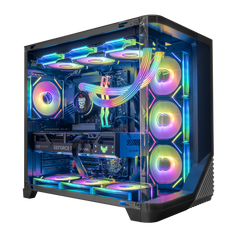




The choice between a stationary rig and a portable machine defines your user experience for years: where you can play, how much noise your system makes, and how long your hardware remains relevant. Let’s break down the mechanical and practical differences between the two platforms.
Portability vs. Power: The Great Trade-off
A gaming laptop offers an all-in-one solution that fits into a backpack. This portability allows students, traveling professionals, and dorm residents to take their entertainment anywhere. You effectively carry your monitor, keyboard, and computer in a single chassis.
However, true mobility comes with caveats. High-end gaming requires significant energy input. Without it, the battery gets drained in 60–90 minutes. Plugging the device into a wall outlet solves this issue and gives you the full performance, but you are restricted to a specific spot.
A desktop PC stays in one location most of the time. A desk setup gives you the freedom to use several screens and full-sized tools without carrying a USB hub. Lacking mobility, it offers a superior ergonomic experience.
Your choice depends on your daily routine and environment:
- frequent travelers who need a single device for flights and hotels;
- dorm residents with limited space who need to pack up quickly;
- clean-desk fans who want a tidy area with few visible wires;
- group gamers who visit friends or attend LAN events with hardware.
When you prioritize raw output above all else, the gaming PC wins. You get exactly what you pay for without the "mobile tax" reducing your framerates. While a laptop is impressive for its size, it physically cannot match the unrestricted output of desktop hardware.
Performance Comparison: Mobile vs. Desktop GPUs/CPUs
Silicon requires energy to run fast. The gap in power consumption creates the biggest divide between the two form factors.
As an example, an RTX 4090 desktop card pulls up to 450 watts, which allows it to create incredibly high clock speeds. A gaming laptop limits its chip to roughly 150-175 watts. Using less energy makes the chip run slower.
This energy limit creates a clear performance gap. A top-tier laptop chip often matches a desktop PC card from the previous generation or a mid-range model from the current lineup. Desktops stay fast because they have room for large voltage regulators and heat sinks.
Key technical differences include:
- higher sustained clock speeds on desktop graphics cards;
- desktop processors with higher core counts and voltage limits;
- better stability under heavy multi-threaded workloads;
- superior handling of 4K resolution and ray tracing.
A gaming PC is the go-to option if you want the highest performance. Laptops are impressive engineering feats, yet they still fall behind the raw physics of desktop hardware.
Thermal Challenges and Noise: The Reality of Laptop Gaming
Heat serves as the enemy of electronics. Every watt of electricity your computer uses eventually turns into heat. Thermals represent the biggest engineering challenge for portable machines.
A desktop PC has a massive volume of air inside the case. It uses large fans — often 120mm or 140mm — to move that air silently. High-end towers might even use liquid cooling radiators that span 360mm. This keeps temperatures low with minimal noise.
In contrast, a gaming laptop must dissipate high heat loads through tiny copper heatsinks and small fans. To move enough air, these fans must spin at very high RPMs. This results in a high-pitched whine that can be distracting.
Poor thermals affect how well a machine runs. If a processor reaches its thermal limit (often 100°C), it slows itself down to avoid damage. This is called thermal throttling. A desktop PC generally offers superior thermal headroom, preventing thermal throttling and potentially increasing the hardware's lifespan.
Your surroundings matter when picking a machine regarding noise and cooling:
- open-back headphones let fan noise leak into your ears;
- microphones pick up the sound of laptop fans during calls;
- loud fans disturb other people in a shared room or office;
- gaming at night works best with a silent computer system.
It’s worth mentioning that a desktop produces less noise during heavy tasks.
Upgradeability and Maintenance: Thinking Long-Term
Technology moves fast. The game that runs smoothly today might struggle on medium settings three years from now. Upgradeability is the primary superpower of the desktop platform.
When your desktop PC starts to feel slow, you can swap out the graphics card, add more RAM, or upgrade the CPU. You keep your case, power supply, and storage. This makes the desktop PC an evolving platform rather than a disposable product.
A gaming laptop offers much less freedom. While some models allow you to add storage or RAM, many modern thin-and-light gaming machines have soldered components that cannot be upgraded. Once the graphics chip falls behind, you have to replace the entire machine. This lack of upgradeability limits the long-term value of the purchase.
These differences change the lifespan of your investment. A desktop case and power supply can last over ten years, housing several generations of hardware. Repairs are also easier. A broken desktop keyboard costs little to replace. A broken laptop keyboard often requires an expensive, professional repair service.
Consider your technical plans when evaluating lifespan:
- willingness to open the case and install new parts;
- desire to keep the same machine for five or more years;
- interest in customizing the look with RGB or new cases;
- need for specific expansion cards, like video capture or audio.
The gaming PC adapts to your needs over time. The gaming laptop remains a static device from the day you buy it until the day you recycle it.
Price-to-Performance Ratio: Which Offers More for Your Dollar?
Price is rarely just about the initial purchase; it is about the price per frame and the total cost of ownership. Desktops generally offer a better ratio. You pay for the silicon, not the engineering required to miniaturize it.
When you look at a 2000 dollars gaming PC, you are looking at a machine capable of high-refresh-rate 1440p or 4K gaming. A laptop at the same price point will typically perform one or two tiers lower. You pay a premium for the portability and the engineering required to cram high-performance parts into a shell.
However, the comparison gets complicated when you factor in peripherals. A laptop comes with a screen, keyboard, and trackpad included. For a desktop, you must purchase a monitor, mouse, and keyboard separately. This can add significantly to your initial budget if you do not already have a desk setup.
Despite the higher upfront cost for peripherals, the desktop retains value better. You can carry your high-end monitor and mechanical keyboard forward to your next build.
Here is how the financial value breaks down over time:
- desktops allow incremental spending on upgrades;
- laptops require a large lump sum for a full replacement;
- resale value for individual desktop parts is often higher;
- repair costs for desktops are generally lower due to standard parts.
If you already have a decent desk setup with a monitor, the desktop is the clear financial winner. If you are starting from zero and need a machine immediately for school and gaming, the gaming laptop offers a complete package in one box.
Ultimately, both machines have their place. By understanding the thermals, power consumption, and physical limitations of each, you can select the rig that fits your style at Hyper Cyber. Choose the gaming laptop for mobility. Choose the gaming PC for power, cooling, and upgradeability.


