


























CAD Workstations

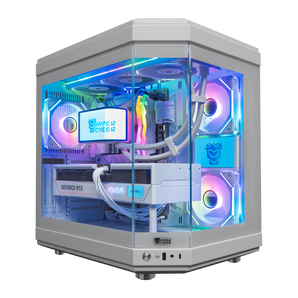
Quick view $4,719 / Hyper Cyber Ultra White | AMD Ryzen 7 9800X3D | NVIDIA GeForce RTX 5070 Ti 16GB | Internal LCD Screen | Gaming PCAMD Ryzen 7 9800X3DNVIDIA GeForce RTX 5070 TI 16GB32GB DDR5 16x2 RGB 64002TB M.2 NVMe SSD

Quick view $10,239 / Hyper Cyber Quantum | AMD Ryzen 7 9800X3D | NVIDIA GeForce RTX 5090 | Gaming PCAMD Ryzen 7 9800X3DNVIDIA GeForce RTX 5090 32GB32GB DDR5 16x2 RGB 64001TB M.2 NVMe SSD

Quick view $11,399 / Hyper Cyber Quantum | Intel Core Ultra 9 285k | NVIDIA GeForce RTX 5090 | Gaming PCintel core ultra 9 285kNVIDIA GeForce RTX 5090 32GB64GB DDR5 32x2 RGB4TB M.2 NVMe SSD

Quick view $4,079 / Hyper Cyber Ultra White | AMD Ryzen 7 9800X3D | NVIDIA GeForce RTX 5070 12GB | Internal LCD Screen | Gaming PCAMD Ryzen 7 9800X3DNVIDIA GeForce RTX 5070 12GB32GB DDR5 16x2 RGB 64001TB M.2 NVMe SSD

Quick view $4,939 / Hyper Cyber Ultra Black | AMD Ryzen 7 9800X3D | NVIDIA GeForce RTX 5080 | Gaming PCAMD Ryzen 7 9800X3DNVIDIA GeForce RTX 5080 16GB32GB DDR5 16x2 RGB 64002TB M.2 NVMe SSD

Quick view $4,119 / Hyper Cyber Ultra White | AMD Ryzen 7 9800X3D | NVIDIA GeForce RTX 5070 | Gaming PCAMD Ryzen 7 9800X3DNVIDIA GeForce RTX 5070 12GB32GB DDR5 16x2 RGB 64002TB M.2 NVMe SSD

Quick view $4,439 / Hyper Cyber QUANTUM Gaming Desktop AMD Ryzen 7 9800X3D, NVIDIA GeForce RTX 5060 Ti, 64GB DDR5, 1TB SSD, WIN11 Home, RGB Lighting, Ready to Use, Custom Cooler DisplayAMD Ryzen 7 9800X3DNVIDIA GeForce RTX 5060 TI 16GB64GB DDR5 32x2 RGB1TB M.2 NVMe SSD
Quick view $11,899 / Hyper Cyber Ultra White | AMD Ryzen 9 9950X3D | NVIDIA GeForce RTX 5090 | 64GB DDR5, 2TB SSD | Internal LCD Screen | Gaming PCAMD Ryzen 9 9950X3DNVIDIA GeForce RTX 5090 32GB White64GB DDR5 32x2 RGB2TB M.2 NVMe SSD

Quick view $11,859 / Hyper Cyber Ultra Black+ | AMD Ryzen 9 9950X3D | NVIDIA GeForce RTX 5090 | 64GB DDR5, 4TB SSD | Side Panel Custom Display | Gaming PCAMD Ryzen 9 9950X3DNVIDIA GeForce RTX 5090 32GB64GB DDR5 32x2 RGB4TB M.2 NVMe SSD

Quick view $5,179 / Hyper Cyber Ultra White+ | AMD Ryzen 9 9950X3D | NVIDIA GeForce RTX 5070 TI 16GB | 32GB DDR5, 2TB SSD, Windows 11 Home, RGB Lighting, WiFi, Side Panel Custom Display, Ready to UseAMD Ryzen 9 9950X3DNVIDIA GeForce RTX 5070 TI 16GB32GB DDR5 16x2 RGB 64002TB M.2 NVMe SSD

Quick view $5,079 / Hyper Cyber Terra+ Gaming Desktop AMD Ryzen 9 9950X3D, Radeon RX 9070 XT, 64GB DDR5, 4TB SSD, Windows 11 Home, RGB Lighting, WiFi, Ready to UseAMD Ryzen 9 9950X3DAMD Radeon RX 9070 XT 16 GB64GB DDR5 32x2 RGB4TB M.2 NVMe SSD

Quick view $5,639 / Hyper Cyber Ultra White | AMD Ryzen 9 9950X3D | NVIDIA GeForce RTX 5080 | 32GB DDR5, 4TB SSD | Internal LCD Screen | Gaming PCAMD Ryzen 9 9950X3DNVIDIA GeForce RTX 5080 16GB32GB DDR5 16x2 RGB 64004TB M.2 NVMe SSD


We understand that running complex design software requires more than a standard office PC can handle. A dedicated CAD machine manages massive 2D and 3D datasets without crashing or slowing down. They are engineered for professional 3D workloads, where accuracy, consistency, and sustained performance matter more than raw consumer specs.
You get specific driver optimizations for engineering tools when you switch to a specialized machine. High precision in visual display and calculation speed defines a true workstation. We build our systems to handle the stress of daily professional use. A regular computer simply lacks the architecture to maintain this level of throughput over time.
Hardware specs for demanding software
Our catalog features systems built on feedback from users working in AutoCAD, SolidWorks, Revit, and CAM applications. We select components that match specific software needs to maximize efficiency.
- Professional GPU choices specifically verified for viewport stability.
- High-frequency CPU cores for modeling and high core counts for rendering.
- 32 GB to 64 GB of RAM provides the necessary headroom for multitasking.
- Fast NVMe SSD storage allows for quick project loading and saving.
These configurations are optimized for rendering and post-production, where long processing times demand stable thermals and predictable performance. These specs matter when you look to buy a reliable machine. You can order these custom builds online right here in the USA. We configure every unit to match the demands of a professional environment.
Stability for long engineering tasks
Reliability Requirements for Engineering Workflows
A true workstation is a powerhouse that stays productive through the longest rendering sessions:
- Speed: heavy scenes open instantly when the SSD has enough room.
- Multitasking: spacious RAM allows you to manage conjunctions of linked parts simultaneously.
- Consistency: our builds support engineering groups that rely on advanced design logic and need consistent precision during every stage of production.
For teams exploring AI-accelerated desktops, this level of stability is critical when workflows involve simulation, automation, or data-driven design. Complex 3D assemblies push both CPU and GPU resources to the limit, and a smartly built PC deals with this load without crashing or overheating. Expand your creative capabilities with a high-end 3D graphics computer.
Who needs these systems
We build these systems for people who demand consistent results and cannot compromise on speed.
- Architects drafting detailed plans in AutoCAD.
- Mechanical engineers building complex assemblies in SolidWorks.
- Specialists running CAM and CAE simulations.
- Industrial design experts are creating product prototypes.
Every professional needs a PC that keeps up with their thoughts. We deliver technical excellence with every desktop. You get maximum performance from the CPU, GPU, RAM, and SSD configuration. Trust our reliability and precision for your critical projects. You can buy your next system with confidence. Order online, and we ship anywhere in the USA.
CAD Workstation FAQ
Find quick answers about RAM requirements for large assemblies, GPU choices for engineering software, CPU priorities in AutoCAD, simultaneous modeling and rendering, and out-of-the-box software readiness.
How much RAM do I need in a desktop computer for CAD work involving large assemblies?
For most AutoCAD and SolidWorks projects, 32GB is a solid baseline. Large multi-part assemblies, simulation runs, or simultaneous CAM sessions benefit noticeably from 64GB or more.
Does a workstation for CAD need a professional GPU, or can a consumer graphics card handle it?
Many mid-range GeForce cards handle drafting and moderate 3D work well. For validated drivers, stable viewport performance in SolidWorks or Revit, and ECC support, professional-grade GPUs like NVIDIA RTX A-series are the safer choice.
Why does CPU single-core speed matter more than core count for AutoCAD specifically?
AutoCAD's core engine is largely single-threaded, so higher clock speed directly reduces pan, zoom, and command lag. High core counts become more relevant when rendering, running simulations, or multitasking alongside other engineering tools.
Can these engineering desktop computers handle both CAD modeling and rendering in the same session?
Yes, builds with a high-core-count CPU, 64GB DDR5 RAM, and a fast NVMe SSD are configured to keep the modeling environment responsive while a render job processes in the background simultaneously.
Are Hyper Cyber CAD workstation desktops ready to run engineering software out of the box?
Each system ships with Windows 11 preinstalled and stress-tested for stability under sustained professional workloads, so you can install AutoCAD, SolidWorks, or Revit and start your project immediately.


