


























NVIDIA GeForce RTX 5070 & RTX 5070 Ti Gaming PCs

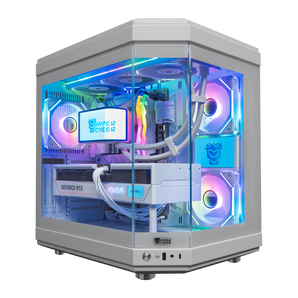
Quick view $4,239 / Hyper Cyber Ultra White | AMD Ryzen 7 9800X3D | NVIDIA GeForce RTX 5070 Ti 16GB | Internal LCD Screen | Gaming PCAMD Ryzen 7 9800X3DNVIDIA GeForce RTX 5070 TI 16GB32GB DDR5 16x2 RGB 64002TB M.2 NVMe SSD

Quick view $3,679 / Hyper Cyber Ultra White | AMD Ryzen 7 9800X3D | NVIDIA GeForce RTX 5070 12GB | Internal LCD Screen | Gaming PCAMD Ryzen 7 9800X3DNVIDIA GeForce RTX 5070 12GB32GB DDR5 16x2 RGB 64001TB M.2 NVMe SSD

Quick view $3,699 / Hyper Cyber Ultra White | AMD Ryzen 7 9800X3D | NVIDIA GeForce RTX 5070 | Gaming PCAMD Ryzen 7 9800X3DNVIDIA GeForce RTX 5070 12GB32GB DDR5 16x2 RGB 64002TB M.2 NVMe SSD

Quick view $3,839 / Hyper Cyber Ultra Black+ | AMD Ryzen 7 9850X3D | NVIDIA GeForce RTX 5070 | 32GB DDR5, 1TB SSD | Side Panel Custom Display | Gaming PCAMD Ryzen 7 9850X3DNVIDIA GeForce RTX 5070 12GB32GB DDR5 16x2 RGB 64001TB M.2 NVMe SSD

Quick view $3,719 / Hyper Cyber Phantom Gaming Desktop AMD Ryzen 7 7800X3D, NVIDIA GeForce RTX 5070, 32GB DDR5, 4TB SSD, Windows 11 Home, RGB Lighting, WiFi, Ready to UseAMD Ryzen 7 7800X3DNVIDIA GeForce RTX 5070 12GB32GB DDR5 16x2 RGB 64004TB M.2 NVMe SSD

Quick view $3,639 / Hyper Cyber Ultra White+ | AMD Ryzen 7 7800X3D | NVIDIA GeForce RTX 5070 12GB | Side Panel Custom Display | Internal LCD Screen | Gaming PCAMD Ryzen 7 7800X3DNVIDIA GeForce RTX 5070 12GB32GB DDR5 16x2 RGB 64001TB M.2 NVMe SSD

Quick view $4,659 / Hyper Cyber Ultra White+ | AMD Ryzen 9 9950X3D | NVIDIA GeForce RTX 5070 Ti 16GB | 32GB DDR5, 2TB SSD, Windows 11 Home, RGB Lighting, WiFi, Side Panel Custom Display, Internal LCD Screen, Ready to UseAMD Ryzen 9 9950X3DNVIDIA GeForce RTX 5070 TI 16GB32GB DDR5 16x2 RGB 64002TB M.2 NVMe SSD

Quick view $3,679 / Hyper Cyber Ultra White+ | AMD Ryzen 7 7800X3D | NVIDIA GeForce RTX 5070 | 32GB DDR5, 1TB SSD, Windows 11 Home, RGB Lighting, WiFi, Side Panel Custom Display, Internal LCD Screen, Ready to UseAMD Ryzen 7 7800X3DNVIDIA GeForce RTX 5070 12GB32GB DDR5 16x2 RGB 64001TB M.2 NVMe SSD
Quick view $4,419 / Hyper Cyber Ultra White | AMD Ryzen 7 7800X3D | NVIDIA GeForce RTX 5070 12GB | 64GB DDR5, 2TB SSD | Internal LCD Screen | Gaming PCAMD Ryzen 7 7800X3DNVIDIA GeForce RTX 5070 12GB64GB DDR5 32x2 RGB White2TB M.2 NVMe SSD

Quick view $4,179 / Hyper Cyber Ultra Black Gaming Desktop AMD Ryzen 7 7800X3D, NVIDIA GeForce RTX 5070, 64GB DDR5, 2TB SSD, Windows 11 Home, Custom Cooler Display, Internal Mini Display, RGB Lighting, WiFi, Ready to UseAMD Ryzen 7 7800X3DNVIDIA GeForce RTX 5070 12GB64GB DDR5 32x2 RGB2TB M.2 NVMe SSD

Quick view $4,419 / Hyper Cyber Ultra Black Gaming Desktop AMD Ryzen 7 7800X3D, NVIDIA GeForce RTX 5070, 64GB DDR5, 4TB SSD, Windows 11 Home, Custom Cooler Display, Internal Mini Display, RGB Lighting, WiFi, Ready to UseAMD Ryzen 7 7800X3DNVIDIA GeForce RTX 5070 12GB64GB DDR5 32x2 RGB4TB M.2 NVMe SSD

Quick view $4,559 / Hyper Cyber Terra Gaming Desktop Intel Core i9-14900K, NVIDIA GeForce RTX 5070 Ti, 64GB DDR5, 2TB SSD, Windows 11 Home, AI Ready, RGB Lighting, WiFi, Ready to UseIntel Core i9 14900KNVIDIA GeForce RTX 5070 TI 16GB64GB DDR5 32x2 RGB2TB M.2 NVMe SSD


RTX 5070 or RTX 5070 Ti: start with the workload
The RTX 5070 and RTX 5070 Ti use NVIDIA's Blackwell architecture and support current GeForce features including ray tracing, DLSS Super Resolution, Ray Reconstruction, Frame Generation, Multi Frame Generation, Reflex, and AV1 encoding. The practical difference is how much GPU capacity the system provides and what the complete build costs.
For the full buying decision, read our RTX 5070 vs RTX 5070 Ti guide.
| Reference specification | GeForce RTX 5070 | GeForce RTX 5070 Ti |
|---|---|---|
| CUDA cores | 6,144 | 8,960 |
| Memory | 12GB GDDR7 | 16GB GDDR7 |
| Memory interface | 192-bit | 256-bit |
| Total graphics power | 250W | 300W |
| NVIDIA reference system power | 650W | 750W |
Reference specifications: NVIDIA GeForce RTX 5070 family. NVIDIA bases its reference system-power figures on a Ryzen 9 9950X system. Add-in-card designs and complete-system power requirements vary.
Choose an RTX 5070 system when
Your main target is 1440p gaming, 12GB of graphics memory fits your games and applications, and you would rather direct more of the system budget toward the CPU, storage, memory, cooling, or monitor. Settings, patches, and CPU load still affect the result, so no one frame-rate promise applies to every game.
Choose an RTX 5070 Ti system when
You want a 16GB graphics-memory buffer, more GPU resources, and additional headroom for demanding settings, higher-resolution workloads, or GPU-accelerated creation. The Ti also carries higher reference graphics power, so compare the exact power supply, cooling, and total system price. If 4K is the main target, also review our 4K gaming PCs.
For a game-specific example, see our guide to choosing a Fortnite PC for 1080p or 1440p.
Match the CPU to the game and monitor
Competitive high-refresh games can put more pressure on the CPU, especially at lower resolutions or reduced settings. Higher graphics settings and resolutions shift more of the workload toward the GPU. A current six-core or eight-core processor can be a sensible partner for a 1440p-focused RTX 5070 system, while a stronger gaming-focused CPU may be useful for CPU-sensitive high-refresh titles. Higher-core processors make more sense when rendering, editing, compiling, or heavy multitasking is part of the workload.
Do not pair every RTX 5070 Ti with the most expensive processor by default. Compare the exact CPU, memory, storage, power supply, cooling, and monitor target on each listing.
Compare the complete PC, not only the GPU
- Monitor: Start with resolution and refresh rate.
- Games and settings: Check the titles you actually play and whether ray tracing or upscaling is part of the plan.
- CPU: Spend for CPU-sensitive high-refresh gaming or productive work only when the workload supports it.
- Memory and storage: Size RAM for gaming plus background applications, and choose storage around the real library.
- Power and cooling: Use the exact product specification rather than assuming every add-in card has the same design.
RTX 5070 and RTX 5070 Ti FAQ
What is the biggest hardware difference between RTX 5070 and RTX 5070 Ti?
NVIDIA lists the RTX 5070 with 6,144 CUDA cores and 12GB of GDDR7 on a 192-bit interface. The RTX 5070 Ti has 8,960 CUDA cores and 16GB of GDDR7 on a 256-bit interface. The Ti also has higher reference graphics power.
Is an RTX 5070 gaming PC a good fit for 1440p?
It is a sensible starting point for a 1440p-focused system. The final experience depends on the game, graphics settings, CPU, and target refresh rate, so check those factors before choosing a complete configuration.
Does the RTX 5070 Ti automatically offer better value?
No. It provides more GPU resources and a larger memory buffer, but value depends on the complete-system price and whether the buyer's games or workloads use that extra capacity. A better monitor, CPU, storage, or cooling upgrade may matter more in some builds.
How much power does each GPU need?
NVIDIA lists 250W total graphics power and 650W reference system power for the RTX 5070, and 300W total graphics power with 750W reference system power for the RTX 5070 Ti. Those system figures use NVIDIA's reference configuration; the exact card model and complete PC can change the requirement.
Do both GPUs support DLSS and frame generation?
Yes. NVIDIA lists both cards with DLSS features including Super Resolution, Ray Reconstruction, Frame Generation, and Multi Frame Generation. Support and image-quality tradeoffs vary by game and selected mode.
Should the CPU change when moving from RTX 5070 to RTX 5070 Ti?
Not automatically. CPU choice should follow the target games, refresh rate, streaming or creation workload, and total budget. Compare the complete system instead of pairing every Ti card with the most expensive processor.
Choose the system around your real target
Compare current NVIDIA gaming PCs, review the exact specifications on each listing, or configure a custom PC around your monitor, games, and workload.


