

























Gaming PCs Under $2,000

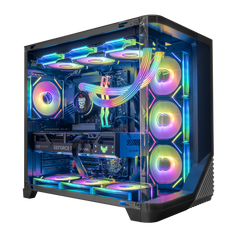
Quick view $1,739 / Hyper Cyber Pulse Gaming Desktop AMD Ryzen 5 5500, AMD Radeon RX 9060 XT, 16GB DDR4, 512GB, Windows 11 Home, RGB Lighting, Ready to UseAMD Ryzen 5 5500AMD Radeon RX 9060 XT16GB DDR4 8x2 3200512GB

Quick view $1,739 / Hyper Cyber Colossus | AMD Ryzen 5 5500 | AMD Radeon RX 9060 XT | 16GB DDR4, 512GB SSD, Windows 11 Home, RGB Lighting, WiFi, Ready to UseAMD Ryzen 5 5500AMD Radeon RX 9060 XT16GB DDR4 8x2 3200512GB

Quick view $1,739 / Hyper Cyber Phantom Gaming Desktop AMD Ryzen 5 5500, AMD Radeon RX 9060 XT, 16GB DDR4, 512GB, Windows 11 Home, RGB Lighting, WiFi, Ready to UseAMD Ryzen 5 5500AMD Radeon RX 9060 XT16GB DDR4 8x2 3200512GB

Quick view $1,719 / Hyper Cyber Terra+ Gaming Desktop AMD Ryzen 5 5500, AMD Radeon RX 9060 XT, 16GB DDR4, 512GB SSD, Windows 11 Home, RGB Lighting, WiFi, Ready to UseAMD Ryzen 5 5500AMD Radeon RX 9060 XT16GB DDR4 8x2 3200512GB

Quick view $1,719 / Hyper Cyber Terra Gaming Desktop AMD Ryzen 5 5500, AMD Radeon RX 9060 XT, 16GB DDR4, 512GB SSD, Windows 11 Home, RGB Lighting, WiFi, Ready to UseAMD Ryzen 5 5500AMD Radeon RX 9060 XT16GB DDR4 8x2 3200512GB

Quick view $1,719 / Hyper Cyber Nova Gaming Desktop AMD Ryzen 5 5500, AMD Radeon RX 9060 XT, 16GB DDR4, 512GB SSD, Windows 11 Home, RGB Lighting, WiFi, Ready to UseAMD Ryzen 5 5500AMD Radeon RX 9060 XT16GB DDR4 8x2 3200512GB

Quick view $1,719 / Hyper Cyber Quantum Gaming Desktop AMD Ryzen 5 5500, AMD Radeon RX 9060 XT, 16GB DDR4, 512GB, Windows 11 Home, RGB Lighting, WiFi, Ready to UseAMD Ryzen 5 5500AMD Radeon RX 9060 XT16GB DDR4 8x2 3200512GB
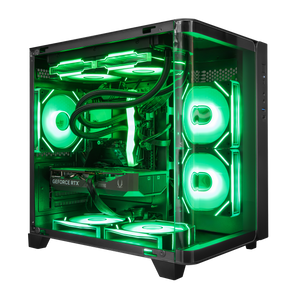
Quick view $1,659 / Hyper Cyber Pulse Gaming Desktop AMD Ryzen 5 5500, NVIDIA GeForce RTX 5060 Ti 8GB, 16GB DDR4, 512GB, Windows 11 Home, RGB Lighting, Ready to UseAMD Ryzen 5 5500NVIDIA GeForce RTX 5060 TI 8GB16GB DDR4 8x2 3200512GB-
Quick view $1,659 / Hyper Cyber Colossus | AMD Ryzen 5 5500 | NVIDIA GeForce RTX 5060 Ti 8GB | 16GB DDR4, 512GB SSD, Windows 11 Home, RGB Lighting, WiFi, Ready to UseAMD Ryzen 5 5500NVIDIA GeForce RTX 5060 TI 8GB16GB DDR4 8x2 3200512GB 
Quick view $1,659 / Hyper Cyber Nova Gaming Desktop AMD Ryzen 5 5500, NVIDIA GeForce RTX 5060 Ti 8GB, 16GB DDR4, 512GB SSD, Windows 11 Home, RGB Lighting, WiFi, Ready to UseAMD Ryzen 5 5500NVIDIA GeForce RTX 5060 TI 8GB16GB DDR4 8x2 3200512GB
Quick view $1,659 / Hyper Cyber Phantom Gaming Desktop AMD Ryzen 5 5500, NVIDIA GeForce RTX 5060 Ti 8GB, 16GB DDR4, 512GB, Windows 11 Home, RGB Lighting, WiFi, Ready to UseAMD Ryzen 5 5500NVIDIA GeForce RTX 5060 TI 8GB16GB DDR4 8x2 3200512GB-
Quick view $1,639 / Hyper Cyber Terra+ Gaming Desktop AMD Ryzen 5 5500, NVIDIA GeForce RTX 5060 Ti, 16GB DDR4, 512GB SSD, Windows 11 Home, RGB Lighting, WiFi, Ready to UseAMD Ryzen 5 5500NVIDIA GeForce RTX 5060 TI 8GB16GB DDR4 8x2 3200512GB


Direct answer: For a gaming-first PC under $2,000, start with the display and games, then give the graphics card priority. The processor, memory, storage, cooling, and power supply still need to support that target. The goal is a balanced configuration for the way you play, not the largest number in every specification field.
What to expect from a gaming PC under $2,000
This budget can cover responsive 1080p gaming and, with the right graphics card and settings, many 1440p targets. It does not guarantee one frame rate, preset, or resolution across every current game. Performance changes with the exact GPU and CPU, game version, graphics settings, ray tracing, upscaling, memory, background applications, and monitor.
Use each live product page as the source of truth for its current processor, graphics card, memory, storage, power supply, operating system, price, and availability. Choose by those fields rather than by the case name alone.
Prioritize the graphics card for a gaming-first system
The graphics card usually has the most direct effect on the resolution, visual settings, and graphics headroom available in a gaming-first PC. Start with the monitor and the games you plan to play. A buyer focused on 1080p competitive play may make a different choice from someone targeting detailed 1440p single-player games.
Do not turn that priority into a fixed percentage of the total budget. Component prices and complete-system costs change. Select the GPU tier that fits the target, then verify that the rest of the system supports it without obvious waste or an avoidable constraint.
Choose the CPU for the frame-rate target and workload
The processor still matters. Competitive games at very high refresh rates, strategy and simulation titles, heavily modded games, and some open-world workloads can put more pressure on the CPU. Streaming, editing, compiling, virtual machines, and other threaded work can also justify more processor capacity than a gaming-only system.
For a gaming-first purchase, avoid paying for CPU capacity that does not improve the named games, monitor target, or non-gaming workload. The best pairing is the one that meets the actual use case while leaving enough budget for the graphics card and supporting components.
RAM and storage: set a practical floor
Sixteen gigabytes of memory can remain workable for many gaming-focused systems when heavy background applications are closed. Thirty-two gigabytes becomes more useful for larger games, streaming, content creation, virtual machines, local development, or frequent multitasking. Check the exact memory capacity and generation on the product page; do not assume every system in a price band uses the same platform.
A 512GB SSD can hold Windows and a focused game library, but it may fill quickly once large games, media, and project files are installed. One terabyte or more is more comfortable for a larger active library. Storage capacity does not increase frame rate, so buy the space you will use and keep an expansion plan in mind.
Cooling, power, and the enclosure still need to fit
Cooling and power should be matched to the actual CPU and graphics card. More fans, a larger cooler, or a higher-wattage power supply is not automatically better; the parts need appropriate thermal capacity, connectors, airflow, and upgrade room. Confirm the exact product specification instead of applying one power or cooling rule to every system.
The case is also part of the finished setup. Size, airflow, component clearance, front I/O, noise goals, and visual design can all matter. Treat appearance as a deliberate ownership choice after the performance and compatibility requirements are covered.
Compare the adjacent budget tiers
- Gaming PCs under $1,500: start here when the main goal is a focused 1080p system and the lower total cost matters more than added graphics or storage headroom.
- Gaming PCs under $2,000: use this collection when you want more room to prioritize the graphics card while keeping the rest of the system practical.
- Gaming PCs under $3,000: compare this tier when the target calls for a stronger complete platform, a higher graphics class, heavier multitasking, or more capacity.
If the live configurations do not match the monitor, games, design, or workload you have in mind, use the custom PC builder to specify the CPU, GPU, memory, storage, and operating system you need.
Choosing between the current graphics options? Read our guide to the best gaming PC under $2,000 for a practical breakdown of GPU priority, CPU tradeoffs, memory, storage, and upgrade headroom.
Gaming PC under $2,000 FAQ
Can a gaming PC under $2,000 handle 1440p?
It can, depending on the exact graphics card, processor, game, settings, and refresh-rate target. Check a current game-specific test that matches the configuration you are considering rather than relying on one universal FPS claim.
Should I prioritize the GPU or CPU?
For a gaming-first system, prioritize the GPU after defining the monitor and game target. Give the CPU more weight for very high-refresh, CPU-sensitive, simulation, streaming, editing, or other threaded workloads.
Is 16GB of RAM enough for gaming?
It can be enough for many gaming-focused systems, especially when heavy background applications are closed. Consider 32GB when the games, streaming setup, creation tools, virtual machines, or multitasking actually need more capacity.
Is a 512GB SSD enough?
It is usable for Windows and a focused library, but large games can fill it quickly. Choose 1TB or more when you want a larger installed library or work with media and project files.
Can every PC under $2,000 run games at 4K?
No. Some configurations and games may be suitable for 4K with appropriate settings or upscaling, but 4K is not a universal promise for this price band. Verify the exact GPU, game, settings, and target frame rate.
Should I buy a prebuilt configuration or request a custom PC?
Choose a current configuration when its complete specification already matches your games, monitor, capacity, and design goals. Use the custom builder when you need a different balance of CPU, GPU, memory, storage, or appearance.
Choose from the live specification
Start with the game, resolution, refresh target, and non-gaming workload. Compare the live product specifications, then spend the next dollar where it removes a real constraint. Browse the current systems above or define a more specific configuration with the custom PC builder.


