


























PCs for Flight Sim

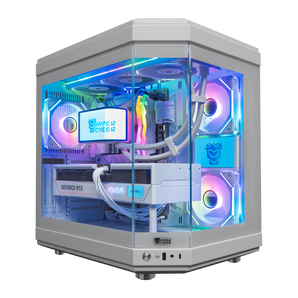
Quick view $4,239 / Hyper Cyber Ultra White | AMD Ryzen 7 9800X3D | NVIDIA GeForce RTX 5070 Ti 16GB | Internal LCD Screen | Gaming PCAMD Ryzen 7 9800X3DNVIDIA GeForce RTX 5070 TI 16GB32GB DDR5 16x2 RGB 64002TB M.2 NVMe SSD

Quick view $10,239 / Hyper Cyber Quantum | AMD Ryzen 7 9800X3D | NVIDIA GeForce RTX 5090 | Gaming PCAMD Ryzen 7 9800X3DNVIDIA GeForce RTX 5090 32GB32GB DDR5 16x2 RGB 64001TB M.2 NVMe SSD

Quick view $11,399 / Hyper Cyber Quantum | Intel Core Ultra 9 285K | NVIDIA GeForce RTX 5090 | Gaming PCintel core ultra 9 285kNVIDIA GeForce RTX 5090 32GB64GB DDR5 32x2 RGB4TB M.2 NVMe SSD

Quick view $4,439 / Hyper Cyber Ultra Black | AMD Ryzen 7 9800X3D | NVIDIA GeForce RTX 5080 | Gaming PCAMD Ryzen 7 9800X3DNVIDIA GeForce RTX 5080 16GB32GB DDR5 16x2 RGB 64002TB M.2 NVMe SSD

Quick view $3,699 / Hyper Cyber Ultra White | AMD Ryzen 7 9800X3D | NVIDIA GeForce RTX 5070 | Gaming PCAMD Ryzen 7 9800X3DNVIDIA GeForce RTX 5070 12GB32GB DDR5 16x2 RGB 64002TB M.2 NVMe SSD

Quick view $3,679 / Hyper Cyber Ultra White | AMD Ryzen 7 9800X3D | NVIDIA GeForce RTX 5070 12GB | Internal LCD Screen | Gaming PCAMD Ryzen 7 9800X3DNVIDIA GeForce RTX 5070 12GB32GB DDR5 16x2 RGB 64001TB M.2 NVMe SSD

Quick view $3,839 / Hyper Cyber Ultra Black+ | AMD Ryzen 7 9850X3D | NVIDIA GeForce RTX 5070 | 32GB DDR5, 1TB SSD | Side Panel Custom Display | Gaming PCAMD Ryzen 7 9850X3DNVIDIA GeForce RTX 5070 12GB32GB DDR5 16x2 RGB 64001TB M.2 NVMe SSD

Quick view $1,419 / Hyper Cyber Pulse Gaming Desktop AMD Ryzen 5 5500, NVIDIA GeForce RTX 5050, 16GB DDR4, 512GB, Windows 11 Home, RGB Lighting, Ready to UseAMD Ryzen 5 5500NVIDIA GeForce RTX 5050 8GB16GB DDR4 8x2 3200512GB

Quick view $1,439 / Hyper Cyber Nova Gaming Desktop AMD Ryzen 5 5500, NVIDIA GeForce RTX 5050, 16GB DDR4, 512GB SSD, Windows 11 Home, RGB Lighting, WiFi, Ready to UseAMD Ryzen 5 5500NVIDIA GeForce RTX 505016GB DDR4 8x2 3200512GB

Quick view $3,999 / Hyper Cyber Quantum Gaming Desktop AMD Ryzen 7 9800X3D, NVIDIA GeForce RTX 5060 Ti, 64GB DDR5, 1TB SSD, Windows 11 Home, RGB Lighting, Ready to Use, Custom Cooler DisplayAMD Ryzen 7 9800X3DNVIDIA GeForce RTX 5060 TI 16GB64GB DDR5 32x2 RGB1TB M.2 NVMe SSD

Quick view $11,139 / Hyper Cyber Quantum Gaming Desktop AMD Ryzen 7 7800X3D, NVIDIA GeForce RTX 5090, 64GB DDR5, 4TB SSD, Windows 11 Home, RGB Lighting, Ready to Use, Custom Cooler DisplayAMD Ryzen 7 7800X3DNVIDIA GeForce RTX 5090 32GB64GB DDR5 32x2 RGB4TB M.2 NVMe SSD

Quick view $10,099 / Hyper Cyber Quantum Gaming Desktop AMD Ryzen 7 7800X3D, NVIDIA GeForce RTX 5090, 32GB DDR5, 1TB SSD, Windows 11 Home, RGB Lighting, Ready to Use, Custom Cooler DisplayAMD Ryzen 7 7800X3DNVIDIA GeForce RTX 5090 32GB32GB DDR5 16x2 RGB 64001TB M.2 NVMe SSD


Flight simulation isn't just about playing a game; it’s about replicating the complex reality of aviation. A standard gaming desktop might handle shooters or RPGs just fine, but a dedicated flight setup demands much more serious horsepower. Many flight enthusiasts move to ultra-detail 4K systems to fully appreciate cockpit instruments, terrain depth, and realistic lighting at scale.
A modern sim has to render huge world maps, calculate advanced physics, and generate detailed weather environments simultaneously. While a stylish case and a decent video card might work for casual gaming, a true simulation platform relies on a carefully balanced architecture:
- CPU utilizes high single-core frequency and a strong cache to maintain performance during long runs.
- GPU handles intense graphics and photorealistic scenery, especially necessary to get a 4K resolution or step into VR.
- RAM handles massive add-ons and detailed textures.
- SSD deals with the stutters to keep the feeling of sitting in a real cockpit.
Having a versatile PC, you can enjoy the flight as long as you want, not as long as your machine allows.
Performance requirements for Microsoft Flight Simulator, X-Plane, and DCS
Microsoft Flight Simulator pushes the boundaries of simulation gaming, so your PC is going to render vast landscapes, from dense city skylines to remote mountain ranges.
Here is what the top titles demand to keep your sim running smoothly. For demanding titles like Microsoft Flight Simulator, many pilots choose the maximum performance tier to maintain smooth frame pacing during long-haul flights:
- Microsoft Flight Simulator: requires a high-clock CPU paired with a top-tier GPU to form a steady base. We recommend 32 GB of RAM and an NVMe SSD to ensure world data is always ready.
- X-Plane 12: known for its blade-element theory physics, this title creates heavy work for your processor. Complex weather systems and long-haul routes benefit significantly from premium components.
- DCS World & Prepar3D: these titles reward a computer that packs a punch. They require sustained load capability to handle global scenery packs, covering the USA, Europe, and beyond, often delivered via online updates.
Key Hardware Features in a High-Quality Flight Sim PC
If you want an authentic aviation feel, here are the specs you want:
- 32 GB of RAM is good enough for MSFS.
- NVMe SSD renders massive maps in real-time with minimal-to-no lag.
- A 360 mm AIO Liquid Cooler or a Tier-1 Air Cooler (like the Noctua NH-D15) will prevent thermal throttling.
- An 850W (or higher) 80 Plus Gold PSU is the standard for handling the massive transient power spikes from modern GPUs.
Many users eventually look to upgrade their generic gaming PC to a specialized build once they realize they want deeper immersion and stronger graphics output.
Why Hyper Cyber Flight Sim PCs Deliver the Most Realistic Experience
Here’s why our builds are best for your MSFS experience:
- We test our configurations before offering them for order, and that includes performance in Microsoft Flight Simulator.
- We offer options for the best player experience, including gaming PCs for VR, multi-monitor layouts, and advanced hardware panels.
- We offer customers in the USA to buy a finished computer with fast delivery directly from our online store.
Our configurations are designed for immersive sim setups, supporting VR headsets, multi-monitor cockpits, and advanced flight hardware without compromise. We back each system with support from a team that actually understands the software. Whether you are a rookie or a veteran pilot, we help you get off the ground.
Flight Simulator PC FAQ
Find quick answers about choosing a computer for Microsoft Flight Simulator, including performance for dense scenery, add-ons, VR flying, and long-session stability.
What makes a good computer for flight simulation like Microsoft Flight Simulator?
Great flight simulator computers combine a strong multi-core CPU, powerful GPU, 32GB RAM, and fast NVMe SSD to handle complex scenery, weather, and detailed aircraft smoothly.
Are these PCs for Microsoft Flight Simulator ready to run out of the box?
Yes, each gaming computer for flight simulator arrives prebuilt, stress-tested, and preloaded with Windows, so you can install MSFS or X-Plane and start flying quickly.
Can these systems handle high settings with add-ons, custom scenery, and dense airports?
These computers for flight simulation are designed with extra CPU, GPU, RAM, and storage headroom so you can enjoy detailed add-ons, busy hubs, and realistic weather without major stutters.
Are these flight simulator computers good for VR flying too?
Yes, the top-tier CPUs and RTX GPUs in this collection are selected to drive modern VR headsets, delivering smooth frame times and sharp visuals in supported flight sims.
Is a dedicated best flight simulator computer useful beyond simming?
Absolutely, the same high-end components that power flight sims also excel at video editing, 3D tools, and modern games, so one rig can cover both simming and demanding workflows.


