

























RTX 5080 Gaming PCs

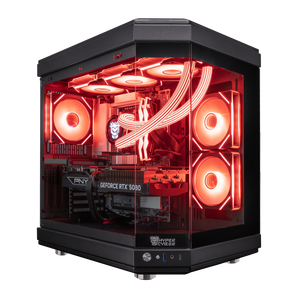
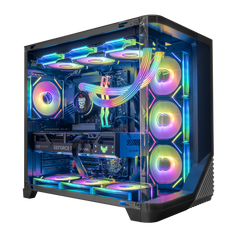
Quick view $6,239 / Hyper Cyber Ultra Black | AMD Ryzen 7 9800X3D | NVIDIA GeForce RTX 5080 | Gaming PCAMD Ryzen 7 9800X3DNVIDIA GeForce RTX 5080 16GB32GB DDR5 16x2 RGB 64002TB M.2 NVMe SSD

Quick view $6,979 / Hyper Cyber Ultra White | AMD Ryzen 9 9950X3D | NVIDIA GeForce RTX 5080 | 32GB DDR5, 4TB SSD | Internal LCD Screen | Gaming PCAMD Ryzen 9 9950X3DNVIDIA GeForce RTX 5080 16GB32GB DDR5 16x2 RGB 64004TB M.2 NVMe SSD

Quick view $7,179 / Hyper Cyber Colossus | AMD Ryzen 7 9800X3D | NVIDIA GeForce RTX 5080 | 64GB DDR5, 2TB SSD, Windows 11 Home, RGB Lighting, WiFi, Ready to UseAMD Ryzen 7 9800X3DNVIDIA GeForce RTX 5080 16GB64GB DDR5 32x2 RGB2TB M.2 NVMe SSD

Quick view $7,359 / Hyper Cyber Quantum Gaming Desktop AMD Ryzen 7 9800X3D, NVIDIA GeForce RTX 5080, 64GB DDR5, 4TB SSD, Windows 11 Home, RGB Lighting, Ready to Use, Custom Cooler DisplayAMD Ryzen 7 9800X3DNVIDIA GeForce RTX 5080 16GB64GB DDR5 32x2 RGB4TB M.2 NVMe SSD

Quick view $6,499 / Hyper Cyber Quantum Gaming Desktop AMD Ryzen 7 9800X3D, NVIDIA GeForce RTX 5080, 32GB DDR5, 4TB SSD, Windows 11 Home, RGB Lighting, Custom Cooler DisplayAMD Ryzen 7 9800X3DNVIDIA GeForce RTX 5080 16GB32GB DDR5 16x2 RGB 64004TB M.2 NVMe SSD

Quick view $5,959 / Hyper Cyber Phantom Gaming Desktop AMD Ryzen 7 7800X3D, NVIDIA GeForce RTX 5080, 32GB DDR5, 2TB SSD, Windows 11 Home, RGB Lighting, WiFi, Ready to UseAMD Ryzen 7 7800X3DNVIDIA GeForce RTX 5080 16GB32GB DDR5 16x2 RGB 64002TB M.2 NVMe SSD

Quick view $6,519 / Hyper Cyber Ultra White | AMD Ryzen 7 9800X3D | NVIDIA GeForce RTX 5080 | Gaming PCAMD Ryzen 7 9800X3DNVIDIA GeForce RTX 5080 16GB32GB DDR5 16x2 RGB 64004TB M.2 NVMe SSD

Quick view $6,219 / Hyper Cyber Ultra Black Gaming Desktop AMD Ryzen 7 9800X3D, NVIDIA GeForce RTX 5080, 32GB DDR5, 2TB SSD, 360 LCD Liquid Cooler, Windows 11 Home, WiFi, Ready to UseAMD Ryzen 7 9800X3DNVIDIA GeForce RTX 5080 16GB32GB DDR5 16x2 RGB 64002TB M.2 NVMe SSD

Quick view $6,099 / Hyper Cyber Colossus Gaming Desktop AMD Ryzen 7 9800X3D, NVIDIA GeForce RTX 5080, 32GB DDR5, 2TB SSD, Windows 11 Home, RGB Lighting, WiFi, Ready to UseAMD Ryzen 7 9800X3DNVIDIA GeForce RTX 5080 16GB32GB DDR5 16x2 RGB 64002TB M.2 NVMe SSD

Quick view $6,019 / Hyper Cyber Ultra Black+ | Intel Core Ultra 5 250K Plus | NVIDIA GeForce RTX 5080 | 32GB DDR5, 1TB SSD, Windows 11 Home, RGB Lighting, WiFi, Side Panel Custom Display, Internal LCD Screen, Ready to UseIntel Core ultra 5 250K PlusNVIDIA GeForce RTX 5080 16GB32GB DDR5 16x2 RGB 64001TB M.2 NVMe SSD

Quick view $7,239 / Hyper Cyber Ultra Black+ | AMD Ryzen 7 9850X3D | NVIDIA GeForce RTX 5080 | 64GB DDR5, 1TB SSD, Windows 11 Home, RGB Lighting, WiFi, Side Panel Custom Display, Internal LCD Screen, Ready to UseAMD Ryzen 7 9850X3DNVIDIA GeForce RTX 5080 16GB64GB DDR5 32x2 RGB1TB M.2 NVMe SSD-
Quick view $7,179 / Hyper Cyber Ultra Black+ | AMD Ryzen 7 9800X3D | NVIDIA GeForce RTX 5080 | 64GB DDR5, 1TB SSD, Windows 11 Home, RGB Lighting, WiFi, Side Panel Custom Display, Internal LCD Screen, Ready to UseAMD Ryzen 7 9800X3DNVIDIA GeForce RTX 5080 16GB64GB DDR5 32x2 RGB1TB M.2 NVMe SSD


RTX 5080 gaming PC FAQ
Is the RTX 5080 good for 4K gaming?
Yes, the RTX 5080 is a high-end option for 4K gaming. The actual frame rate depends on the game, graphics preset, ray tracing, CPU, driver, and use of technologies such as DLSS and Frame Generation. Compare performance using the same resolution and settings you plan to use rather than relying on an isolated FPS number.
What CPU should I pair with an RTX 5080?
Choose the CPU around the workload. Very high refresh-rate and CPU-sensitive games benefit more from stronger gaming CPU performance, while streaming, rendering, editing, and other threaded work may justify additional cores. Resolution also matters because 4K gaming generally shifts more of the workload toward the GPU than 1080p or high-refresh 1440p does.
Do I need 32 GB or 64 GB of memory?
For many gaming-focused builds, 32 GB is a practical starting point. Consider 64 GB for heavy multitasking, large creative projects, virtual machines, or applications known to use more memory. Capacity should be selected from the actual workload, and the product page should also identify the memory speed and module configuration.
Should I buy an RTX 5080 or RTX 5090 gaming PC?
Choose the RTX 5080 when you want a high-end gaming system and would benefit from placing more of the budget into the CPU, storage, display, acoustics, or overall design. Consider the RTX 5090 when maximum GPU performance, 32 GB of graphics memory, or a demanding professional workload creates a clear benefit.
Can Hyper Cyber customize an RTX 5080 PC?
Yes. Use the custom PC builder to request a specific case, processor, memory capacity, storage layout, cooling system, lighting direction, or other configuration requirement. Confirm all final parts and availability before ordering.


