






















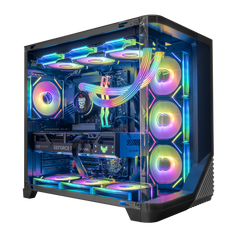




If a desktop is labeled as a gaming PC, it doesn’t mean that it can’t be used for other purposes. It usually hints at the powerful hardware capabilities that can go far beyond enjoying video games. A graphics card capable of rendering a realistic, dynamic game world can handle working with complex 3D models. A high-speed processor that can sort out complex physics in games can also calculate massive datasets. If RAM is good enough for keeping the gameplay smooth, it’s good for video editing as well.
Let’s walk through various uses of gaming PCs and find a new definition for these machines.
Why gaming PCs are universal tools
Gaming computers are built to handle many tasks at the same time. While a game runs, the system calculates how light hits a surface, how objects fall, and how characters move. That’s why the main focus is directed towards performance and heat control.
The Graphics Processing Unit (GPU) is the heart of this performance. Its main job is to solve thousands of small math problems simultaneously. While this helps a gamer see clear images, it also helps professionals finish complex tasks faster.
|
Feature |
Gaming Use |
Professional Use |
|
GPU Math |
Colors millions of pixels |
Handles complex geometry and textures |
|
High Clock Speed |
Smooths character movement |
Compiles data quickly |
|
Multiple Cores |
Manages game AI |
Runs complex simulations |
These parts allow the computer to stay fast in almost any environment.
As for the temperature control, heat slows computers down. Most office workstations simply lack extra cooling. A gaming PC, on the other hand, maintains its performance until the job is done.
Content creation: video editing and 3D rendering
This is how hardware speeds up the workflow:
- Video editing apps like Premiere Pro or DaVinci Resolve use the graphics card's cores to handle heavy lifting.
- 3D software like Blender or Maya splits the work between parts. The graphics card handles the lighting and textures, while the main processor calculates the physics.
- Virtual visual effects studios like After Effects need a fast processor to show motion graphics without lag. A high clock speed keeps the preview window moving at the right speed so you can see your changes instantly.
Memory keeps data ready for the processor. High-resolution video needs plenty of space to breathe to prevent the system from slowing down.
|
RAM Capacity |
Benefit |
|
32GB |
Handling 4K timelines and complex layers |
|
64GB |
High-res real-time previews at the desired speed |
A high-quality gaming pre-built PC functions as a complete production studio straight out of the box.
Streaming and broadcasting: building your own studio
Running a live stream also demands a lot from a computer. A dedicated setup handles these tasks so the video stays clear and the computer stays fast.
A computer manages four different workloads simultaneously to broadcast successfully:
- Gameplay rendering. The graphics card (GPU) draws the game frames quickly to keep the movement smooth for the player.
- Video Encoding. The system shrinks the video so it can travel over the internet. Using hardware like NVIDIA NVENC or AMD AMF takes this load off the main processor.
- Audio Processing. The processor mixes the microphone, game audio, and voice chat. It filters out background noise and levels the volume in real-time.
- Network Activity. The PC sends a constant stream of data to platforms like Twitch while it continues to download game data.
When choosing a computer for streaming, focus on these specific parts:
|
Component |
Target Spec |
Recommended Models |
|
CPU Cores |
8 Cores (minimum) 12–16 Cores (ideal) |
AMD Ryzen 7 9800X3D Intel Core i9 14900K Intel Core Ultra 7 |
|
RAM |
16 GB (minimum) 32 GB (recommended) 64 GB (ideal) |
DDR4 3200 DDR5 4800 DDR5-6400 |
|
Storage |
SSD |
1–4 TB M.2 NVMe SSD |
|
GPU |
12 GB+ VRAM |
RTX 5070 RTX A4000 |
As you see, it’s not only the streamer who does the work, but also the PC.
Productivity and multitasking: coding, data analysis, and AI
Building software and analyzing data require a lot of power. A high-end gaming computer has the extra strength needed for these tasks because the hardware fits the needs of tech professionals.
The hardware advantage:
- Fast processors (CPUs). Multiple cores of a gaming PC speed up code building and let you run several virtual machines at the same time.
- Powerful graphics cards (GPUs). AI models like Stable Diffusion require a lot of Video RAM (VRAM). 12 GB or 24 GB is usually good for local AI work, but more is better.
- Quick storage (NVMe SSDs). Drive type matters. These are much faster than older SATA disks when it comes to loading giant datasets into databases in just a few seconds.
This is why owning your hardware has clear advantages over using the cloud:
- Privacy. Your files stay on your machine, locked from outsiders.
- Economy. No need to pay monthly fees for cloud computing capabilities.
- Speed. Running the model on your own powerful rig makes your daily work feel snappy and responsive.
The value of owning a high-end PC becomes clear when you compare these local hardware advantages to cloud subscriptions. Explore our range of workstations to find your perfect match.
Professional workflows: when a gaming PC outperforms a standard office station
A standard office tower often limits what you can do. Gaming PCs use industry-standard parts, which offer several clear benefits:
- Flexible Parts. You can swap out the graphics card or get a faster processor whenever your work gets heavier. This lets you keep the same computer for years by replacing only the parts that feel slow.
- Room for Data. Standard motherboards come with extra slots for fast storage drives. You can add many terabytes of space for your project archives without needing external boxes or extra cables.
- Better Cooling. Large fans and heat sinks keep the system cool. This allows the computer to run at full speed for hours. You avoid the high-pitched whine and thermal throttling common in cramped office cases.
Cheap workstations often struggle with basic tasks after only two years. High-end components stay useful for much longer. A processor bought for gaming today will handle office tasks and web browsing easily for a long time.
Gaming setups usually include high-refresh-rate monitors. These screens make moving windows and scrolling through text look fluid and clear. This smoothness helps reduce eye strain when you spend all day at your desk.
Choosing a machine built for play is a smart way to handle business. Using high-performance hardware for your daily work gives you a significant advantage.


