






















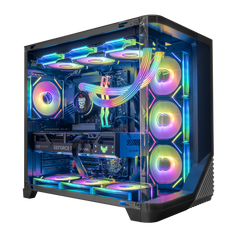




Whether you’re a first-time buyer or a seasoned gamer planning your next rig, one question always comes up:
Should you buy a prebuilt gaming PC or build a custom one yourself?
Today, the gap between prebuilt and custom PCs has narrowed — but each approach still has its own pros, cons, and ideal audience. This guide breaks it all down to help you make the right choice.
🖥️ What Is a Prebuilt PC?
A prebuilt PC is a fully assembled system sold by a manufacturer or retailer. You buy it, unbox it, plug it in — and you’re ready to go. These systems are often tested, optimized, and come with a warranty.
🛠️ What Is a Custom PC?
A custom PC is built piece by piece. You choose every component — from the CPU and GPU to the case and cooling — and either assemble it yourself or pay someone to do it.
✅ Prebuilt PC: Pros
1. Instant Access
Buy it, plug it in, and game. No need to spend hours researching parts or building.
2. Technical Support and Warranty
Most prebuilt systems come with full system warranties and tech support — something you won’t get with a DIY build.
3. Optimized Systems
Reputable builders (like Hyper Cyber) offer well-balanced configs that are tested for stability and thermal performance.
4. No Compatibility Headaches
You won’t need to worry if the RAM is the right speed or if the cooler clears the case — it’s all pre-matched and tested.
❌ Prebuilt PC: Cons
1. Less Customization
You may have limited options for parts, case design, or upgrade paths (though some brands like Hyper Cyber offer more flexibility).
2. Higher Cost (Sometimes)
You’re paying for convenience and service — so some prebuilts may cost more than the sum of individual parts.
3. Bloatware
Some systems come with pre-installed software you don’t need, although premium builders often avoid this.
✅ Custom PC: Pros
1. Full Control Over Every Component
You decide everything — performance, aesthetics, noise level, cooling, even RGB lighting.
2. Optimized Value
If you shop smart and wait for deals, a DIY build can offer more performance per dollar.
3. Learning Experience
Building your own PC helps you understand how everything works and makes upgrades easier in the future.
❌ Custom PC: Cons
1. Time-Consuming
Researching parts, comparing prices, and assembling the build can take hours (or days).
2. No System-Wide Warranty
Each part has its own warranty, but if something goes wrong, you troubleshoot alone.
3. Risk of Mistakes
Wrong part? Forgot thermal paste? Static discharge? DIY builds can go wrong if you’re not careful.
💡 So, Which One Should You Choose?
| If you want... | Go for... |
|---|---|
| Speed and convenience | ✅ Prebuilt |
| Maximum control and customization | ✅ Custom |
| Tech support and system warranty | ✅ Prebuilt |
| Lower price and flexibility | ✅ Custom (if you know how) |
| A solid gaming PC without research headaches | ✅ Prebuilt from a trusted brand |
What to Check Before Buying Any Prebuilt
Most prebuilt problems are not in the headline CPU or GPU. They hide in the parts a listing mentions last. Before you buy any prebuilt—from us or anyone else—confirm:
- Power supply: the brand, wattage, and efficiency rating are listed, with headroom for the graphics card.
- Memory layout: two matched modules running in dual channel, not a single stick.
- Motherboard: the chipset is named and suits the CPU, including any plan to upgrade later.
- Cooling and airflow: the CPU cooler and case fans match the processor's heat output.
- Standard parts: a standard case, motherboard, and power supply, so future upgrades are not blocked by proprietary hardware.
- A full parts list: every component named, not just "high-performance SSD" or "gaming motherboard".
For a full walkthrough of how to match those parts to your games and display, read our guide to choosing the best gaming PC.
🔗 Looking for a Prebuilt PC that Feels Custom?
At Hyper Cyber, every system is listed with its complete configuration, and you can start from a prepared build or configure your own:
1080p gaming PCs → Explore 1080p systems
1440p gaming PCs → Explore 1440p systems
4K gaming PCs → Explore 4K systems
Your own configuration → Use the custom PC builder
Each system is assembled and checked as a complete configuration before it ships. See how Hyper Cyber tests gaming PCs.
🎮 Final Verdict
There’s no wrong choice — only what’s right for you.
If you love the thrill of building and tweaking, go custom.
If you just want a powerful, ready-to-play system with peace of mind — prebuilt is your best friend.
And if you want something that offers the best of both worlds, check out what Hyper Cyber has to offer.


