






















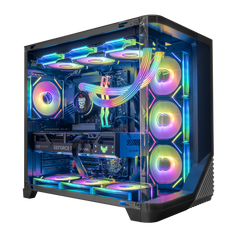




Choosing a PC for school is not just about buying something that can open documents and join video calls. Students use their computers for classwork, research, creative projects, gaming, streaming, coding, editing, and staying connected. For many students, one desktop has to handle the entire day: homework in the afternoon, group projects in the evening, and high-FPS gaming after class.
That is why the best student PC is usually not the cheapest computer on the shelf. It is the one that has enough performance to stay fast, enough storage to last, and enough graphics power for the student's real life outside the classroom.
Start here: shop the Hyper Cyber Back to School Gaming PCs collection.
Start With the Student, Not the Specs
Before comparing processors and graphics cards, start with how the student will actually use the PC. A middle school or high school student may need a computer for homework, web browsing, Minecraft, Roblox, Fortnite, Valorant, and Discord. A college student may need more storage, stronger multitasking, and enough performance for long study sessions, gaming, and media work. A student in engineering, design, architecture, video production, or computer science may need a much stronger machine.
- What grade or university program is the student in?
- Will the PC be used mostly for schoolwork, gaming, or both?
- What games does the student play?
- Will they edit videos, stream, code, design, or use 3D software?
- What monitor will they use: 1080p, 1440p, or 4K?
For Basic Schoolwork, Do You Need a Gaming PC?
For basic homework, web browsing, email, video calls, and documents, almost any modern computer can work. But many students do not use a computer only for school. They also game, stream, create content, edit videos, join online communities, and run multiple apps at once.
A gaming PC gives students more room to grow. It can handle everyday school tasks easily, but it can also support heavier workloads and modern games. That makes it a better long-term investment for students who want one computer for both school and personal use.
CPU: The Processor Matters for Multitasking
The CPU affects how responsive the PC feels when running apps, browsing with many tabs open, joining video calls, editing files, or playing CPU-heavy games. For most students, a modern Intel Core i5, Intel Core i7, AMD Ryzen 5, or AMD Ryzen 7 is a strong place to start.
GPU: The Graphics Card Is Critical for Gaming and Creative Work
The GPU is one of the most important parts of a student gaming PC. It affects gaming performance, visual quality, frame rates, streaming, video editing, 3D work, and some AI or creative applications.
For first gaming PCs and school use, an NVIDIA GeForce RTX 5060 Ti class GPU is a strong starting point. For stronger gaming, streaming, and 1440p monitors, look at RTX 5070 Ti or Radeon RX 9070 XT class systems. For premium student setups, creator workloads, or 4K gaming, RTX 5080 and above can make sense.
RAM: 32GB Is the Smart Student Sweet Spot
Memory helps the PC run multiple tasks at the same time. A student might have a browser open, music playing, Discord running, school apps open, and a game downloading in the background. For a modern student PC, 16GB can still work for basic use, but 32GB is the smarter target.
Storage: 1TB Is Good, 2TB Is Better for College
Storage fills up faster than most people expect. School files are usually small, but games, videos, design files, and media libraries can take a lot of space. A 1TB NVMe SSD is a good starting point. A 2TB NVMe SSD is better for college students, creators, and gamers who want to keep multiple large games installed.
Best PC for High School Students
For high school students, the best PC is usually a balanced gaming desktop that can handle schoolwork and popular games without overcomplicating the buying decision.
- Modern Intel i5, Intel i7, AMD Ryzen 5, or AMD Ryzen 7 CPU
- RTX 5060 Ti or better graphics
- 32GB RAM
- 1TB or 2TB NVMe SSD
- Wi-Fi and Windows 11
Best PC for University and College Students
College students often need more from a PC. They may use it for papers, research, online classes, presentations, coding, gaming, streaming, editing, and entertainment. For university students, we recommend stepping up to a Ryzen 7 or Intel i7 class CPU, RTX 5070 Ti or Radeon RX 9070 XT class graphics, 32GB RAM, and 2TB NVMe storage.
Best PC for Creators, Design Students, and Streamers
Students in video editing, media production, design, animation, architecture, engineering, or streaming should pay closer attention to GPU, RAM, and storage. For creator students, look for Ryzen 7, Ryzen 9, Intel i7, or Intel i9 CPUs, NVIDIA RTX graphics when software benefits from NVIDIA acceleration, 32GB to 64GB RAM, and 2TB or larger NVMe SSD storage.
Desktop vs Laptop for Students
Laptops are portable, which is useful for class. Desktops are usually better for performance, cooling, upgrades, and long gaming sessions. Many students use a simple laptop or tablet for taking notes on campus and a powerful desktop for serious work, gaming, and content creation at home.
Good, Better, Best Student PC Recommendations
Good: First Gaming PC
Best for homework, esports, Minecraft, Roblox, Fortnite, Valorant, and everyday use. Look for Intel Core i5 or Ryzen 5/Ryzen 7, RTX 5060 Ti graphics, 32GB RAM, and a 1TB NVMe SSD.
- Pulse Gaming Desktop with Intel Core i5-14600K, RTX 5060 Ti, 32GB DDR5, and 1TB SSD
- Phantom Gaming Desktop with Intel Core i5-14600K, RTX 5060 Ti, 32GB DDR5, and 1TB SSD
Better: College and 1440p Gaming
Best for students who want more power, better graphics, and a PC that will stay useful longer. Look for AMD Ryzen 7 or Intel i7, RTX 5070 Ti or Radeon RX 9070 XT, 32GB RAM, and 2TB NVMe storage.
- Nova Gaming Desktop with Ryzen 7 7800X3D, Radeon RX 9070 XT, 32GB DDR5, and 2TB SSD
- Phantom Gaming Desktop with Ryzen 7 7800X3D, Radeon RX 9070 XT, 32GB DDR5, and 2TB SSD
- Colossus Gaming Desktop with Ryzen 7 7800X3D, Radeon RX 9070 XT, 32GB DDR5, and 2TB SSD
- Ultra White Gaming Desktop with Ryzen 7 7800X3D, Radeon RX 9070 XT, 32GB DDR5, and 2TB SSD
- Ultra Black Gaming Desktop with Ryzen 7 7800X3D, Radeon RX 9070 XT, 32GB DDR5, and 2TB SSD
Best: Premium Student Gaming and Creator Work
Best for high refresh gaming, streaming, editing, design, and demanding workloads. Look for Ryzen 7 9800X3D, Ryzen 9, Intel i7, or Intel i9, RTX 5070 Ti or RTX 5080 graphics, 32GB to 64GB RAM, and premium cooling.
- Nova Gaming Desktop with Ryzen 7 7800X3D, RTX 5070 Ti, 32GB DDR5, and 2TB SSD
- Colossus Gaming Desktop with Ryzen 7 7800X3D, RTX 5070 Ti, 32GB DDR5, and 2TB SSD
- Ultra Black+ Gaming Desktop with Ryzen 7 9800X3D, RTX 5070 Ti, 32GB DDR5, and 2TB SSD
- Ultra White+ Gaming Desktop with Ryzen 7 9800X3D, RTX 5070 Ti, 32GB DDR5, and 2TB SSD
- Nova Gaming Desktop with Ryzen 7 9800X3D, RTX 5080, 32GB DDR5, and 2TB SSD
Common Mistakes When Buying a Student PC
The first mistake is buying only for today. A PC that barely meets current needs may feel slow sooner than expected. The second mistake is ignoring the graphics card. If the student games, edits video, streams, or uses creative tools, the GPU matters. The third mistake is underbuying storage. Modern games and project files can fill a drive quickly.
Final Checklist Before You Buy
- The student's main games or software
- The monitor resolution
- Whether they stream, edit, code, design, or use 3D tools
- Whether 1TB or 2TB storage makes more sense
- Whether 32GB RAM is included
- Whether the PC has Wi-Fi
- Warranty, shipping, financing, and support options
Shop Hyper Cyber Back to School Gaming PCs
Hyper Cyber builds student-ready gaming PCs for schoolwork, esports, streaming, content creation, and college setups. Whether you are buying a first gaming PC or a premium university setup, we can help you choose the right build.


