


























🎯 Introduction
In competitive esports, every millisecond counts. Whether you’re climbing ranked in Valorant, CS2, or League of Legends, your gear and setup can make the difference between a clutch win and a crushing loss.
This 2025 guide breaks down the ultimate gaming setups for competitive play — from hardware to peripherals — so you can focus on what matters: winning.
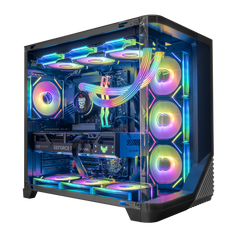
🖥️ 1. The Core – Esports-Ready Gaming PC
For esports, speed and consistency beat raw visual beauty. You don’t need ultra-max 4K graphics — you need high FPS and low latency.
-
CPU: Intel Core i7-14700K / AMD Ryzen 7 7800X3D
-
GPU: NVIDIA RTX 4070 / AMD RX 7800 XT (plenty for 1080p–1440p at 240+ FPS)
-
RAM: 32GB DDR5 (6000MHz or faster)
-
Storage: 1TB NVMe SSD for instant load times
-
Cooling: High-airflow case with quality fans or 240mm AIO
💡 Pro Tip: Many esports pros still play at 1080p for maximum frame rates.
🖼️ 2. Monitors – Speed Over Resolution
-
Refresh Rate: 240Hz–360Hz
-
Response Time: 1ms or less
-
Panel Type: IPS for color accuracy or TN for lowest possible latency
-
Examples: BenQ ZOWIE XL2566K, ASUS ROG Swift PG259QN
Higher refresh rates give smoother motion and let you react faster — a huge edge in FPS games.
🎧 3. Peripherals That Give You the Edge
Mouse
-
Lightweight design (under 70g)
-
High DPI with adjustable settings
-
Examples: Logitech G Pro X Superlight 2, Razer Viper V2 Pro
Keyboard
-
TKL or 60% layout for more mouse room
-
Fast optical or mechanical switches
-
Examples: SteelSeries Apex Pro TKL, Wooting 60HE
Headset
-
Wired preferred for zero lag
-
Clear positional audio for footsteps and environmental cues
-
Examples: HyperX Cloud II, Sennheiser Game Zero
🪑 4. Ergonomics & Comfort
Long scrims and tournaments mean comfort matters:
-
Chair: Adjustable lumbar support, breathable materials
-
Desk: Stable, wide surface with room for large mouse swipes
-
Lighting: Avoid glare; consider bias lighting for eye comfort
🌐 5. Network – Don’t Let Ping Kill Your Game
-
Wired Ethernet over Wi-Fi for stable latency
-
Gigabit or better internet connection
-
Quality router with QoS settings for prioritizing gaming traffic
⚙️ 6. Settings & Optimization
-
Lower graphics settings to boost FPS and reduce visual clutter
-
Turn off unnecessary background apps
-
Calibrate your mouse sensitivity for muscle memory
-
Keep drivers updated for stability and performance
✅ Conclusion
A competitive esports setup isn’t just about flashy gear — it’s about reliable, responsive, and optimized hardware that helps you perform your best. In 2025, the winning formula is high FPS, low latency, ergonomic comfort, and consistency.
💻 Want a custom-built esports-ready PC that hits pro-level performance out of the box? Check out our Best Deals on Gaming PCs — tuned for speed, stability, and competitive play.


