






















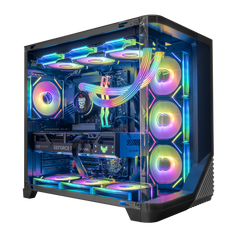




Direct answer: Hyper Cyber reviews a custom PC as one complete configuration before assembly. We start with the buyer's games, applications, display target, budget, component preferences, and upgrade plans. Then we review the processor, graphics card, memory, storage, motherboard, cooling, case, and power supply together. The goal is not to promise a mythical “zero-bottleneck” PC. It is to make sure the parts and priorities make sense for the work the system is expected to do.
This is the planning stage behind our custom PC builder. It is separate from final assembly and from the configuration-appropriate checks we run on the completed system.
Why we do not use a “no bottleneck” promise
Every computer reaches a limit somewhere. In one game or scene, the graphics card may be the main constraint. In another, the processor, game engine, memory capacity, storage activity, a background application, a frame-rate cap, or a thermal condition can change the result. A different resolution, graphics preset, patch, or display target can move the limit again.
That is why a single pairing rule or percentage cannot prove that two parts are perfectly matched for every workload. The useful question is whether the complete system meets the buyer's real target without spending heavily on capability that will not be used. For the technical side of diagnosing limits, read our separate guide to gaming PC bottlenecks and CPU–GPU pairings. This article focuses on what happens before a Hyper Cyber custom configuration moves to assembly.
The review starts with the workload, not the model names
The custom builder asks for budget, processor, graphics card, memory, storage, operating-system preference, and a description of the games, applications, or other priorities that matter. A buyer can choose preferred core parts or ask the team to recommend a direction.
The most useful request answers a few practical questions:
- Games and display: Which games matter most, and what resolution and refresh-rate target will the monitor support?
- Other work: Will the same PC stream, record, edit video, render, compile code, run virtual machines, or handle AI workloads?
- Simultaneous tasks: Which applications need to remain open at the same time?
- Storage: How large is the current game or project library, and how quickly is it likely to grow?
- Physical and visual preferences: Are case size, color, lighting, cooling style, display panels, or desk placement important?
- Upgrade plan: Is the buyer likely to add storage, memory, expansion cards, or a different graphics card later?
- Budget: What is the total ceiling for the complete system, not only the processor and graphics card?
Without that context, a longer parts list can look more impressive while still putting money in the wrong place. With it, the configuration can be judged against a clear job.
How the workload changes component priorities
| Buyer priority | What the review needs to consider |
|---|---|
| High-refresh competitive gaming | The exact games, frame-rate target, display, graphics settings, processor demands, and graphics-card headroom. |
| Visually demanding 1440p or 4K gaming | Graphics-card capability, image-quality settings, cooling, power, case fit, and the display target. |
| Gaming plus streaming or recording | The streaming method, applications used at the same time, memory needs, storage capacity, and complete CPU/GPU workload. |
| Gaming plus sustained creator or technical work | Whether rendering, encoding, compiling, virtual machines, or other heavily threaded work justifies more CPU, memory, or storage budget. |
| Long-term upgrade flexibility | Motherboard features, power delivery, case space, cooling capacity, storage expansion, connectivity, and service access. |
These are decision inputs, not universal component recipes. Two buyers can choose different systems at the same budget because their games, displays, work, storage needs, and upgrade plans are different.
We review the supporting parts as part of the same system
Processor and graphics card
The processor and graphics card are reviewed against the games, applications, settings, resolution, and frame-rate target. One part should not be selected only because it sits higher in a product stack. For a gaming-first system, moving budget to the graphics card, display, or storage may change the experience more than adding CPU cores that the buyer's workload will rarely use. A mixed gaming and production system can justify a different balance.
Our current Ryzen 7 9800X3D versus Ryzen 9 9950X3D comparison shows that decision in one specific CPU family: gaming-first and heavily threaded mixed workloads can point to different priorities. Current systems are available in the Ryzen 7 9800X3D collection and Ryzen 9 9950X3D collection, but the exact listing remains the source for current parts and availability.
Memory and storage
Memory is reviewed for the applications that will run together, not only for one game in isolation. Storage is reviewed for the operating system, game library, recordings, project files, and expected growth. Capacity and configuration matter differently to a gaming-only buyer, a streamer, an editor, or someone managing large technical projects.
Motherboard, cooling, case, and power supply
Supporting parts are not filler around the CPU and GPU. The motherboard has to support the selected platform, memory, storage, connectivity, and expansion needs. Cooling has to suit the installed hardware and physical layout. The case has to provide the required space and service access. The power supply has to be appropriate for the complete configuration. These relationships are reviewed together before the build moves forward.
We do not publish one power-supply percentage, one cooler type, or one case rule as the answer for every PC. The correct choice depends on the actual hardware and layout.
What happens if a requested configuration needs to change
The custom builder is a request for a quote, not an automatic order. Hyper Cyber confirms the proposed build, availability, and price before the customer orders. If a selected part creates a compatibility question or does not fit the intended use, the configuration is reviewed and the buyer is contacted before assembly.
That review is also where practical preferences belong. If a buyer wants a certain case style, cooling approach, motherboard feature, storage layout, or component brand, the request can state it. The team can then judge that preference inside the complete build instead of treating it as an isolated checkbox.
From approved configuration to complete-system checks
Once the configuration is settled, the system is assembled as a complete PC. Hyper Cyber's public testing methodology explains the next stage: the finished system receives checks appropriate to its hardware and what the build team needs to verify. The purpose is to catch an incorrect configuration, instability, or cooling behavior that needs attention while the PC is still with the team.
If a check identifies a problem, the issue is investigated and corrected, and the relevant checks are run again before shipment. We do not claim that every PC receives one identical benchmark, software tool, temperature target, noise level, or test duration. Hardware and workloads differ, so the useful checks can differ too.
Prepared configuration or custom request?
A prepared system can be the simpler choice when a live listing already matches the games, display, applications, storage, appearance, and budget. The product page should be used to verify the current processor, graphics card, memory, storage, cooling, motherboard, power supply, case, operating system, price, and availability.
A custom request makes more sense when the buyer needs a different combination, a specific visual direction, unusual storage or connectivity, a mixed gaming-and-work workload, or help deciding where the budget should go. Buyers can compare current Hyper Cyber gaming PCs or start with the custom PC builder.
Frequently asked questions
Can a gaming PC have no bottleneck?
No PC is free of limits in every workload. The limiting factor can move with the game, scene, settings, resolution, software, and target. A useful configuration is one that meets the buyer's real goals with sensible tradeoffs.
Can I submit only a preferred CPU and GPU?
Yes. The custom builder lets buyers choose preferred core parts and describe the workload. Hyper Cyber then reviews the supporting motherboard, memory, storage, cooling, case, and power supply as part of the complete proposal.
Will Hyper Cyber change the parts I select?
If a selection creates a compatibility question or does not fit the intended use, the configuration is reviewed and the buyer is contacted before assembly. The proposed build, availability, and price are confirmed before an order is placed.
Does every completed PC receive the same test?
No single workload is equally useful for every configuration. The checks can vary with the installed hardware and with what the build team needs to verify. Hyper Cyber does not publish one benchmark, temperature, noise level, software tool, or duration as a universal promise.
What should I include in a custom PC request?
Include the games and applications you use, display resolution and refresh rate, tasks that run at the same time, storage needs, design preferences, component preferences, total budget, and likely upgrades. That information is more useful than a list of model names without context.
Start with the job the PC has to do
A well-planned custom PC begins with a clear brief, continues through a complete-configuration review, and then moves to assembly and configuration-appropriate checks. If a prepared listing does not match what you need, use the Hyper Cyber custom PC builder to share the workload, budget, and preferences that should shape the system.


