






















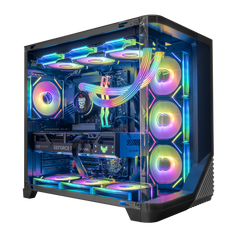




Direct answer: The best gaming PC under $2,000 is the one that puts the most useful share of the budget into the graphics card without leaving the processor, memory, storage, cooling, or power supply mismatched. Start with your monitor, games, and target settings. Then compare complete specifications—not just the case name or one headline component.
A $2,000 ceiling leaves room for a capable gaming system, but it still rewards clear priorities. There is no single configuration that is automatically best for competitive 1080p play, detailed 1440p games, streaming, and creative work at the same time. The right balance depends on which of those jobs matters most.
Start with the experience you want
Before comparing processors or graphics cards, define three things: your monitor resolution, its refresh rate, and the games you actually play. A competitive player using a high-refresh 1080p display can benefit from a different balance than someone building around a 1440p monitor and visually demanding single-player games.
This also prevents a common budget mistake: paying for capability that the monitor or workload cannot show. A higher specification can be useful, but only when it moves a real limit—such as graphics quality, frame-rate consistency, multitasking capacity, or storage space.
| Primary use | First priority | What to verify next |
|---|---|---|
| 1080p competitive gaming | Frame-rate target and CPU/GPU balance | Monitor refresh rate, game settings, memory configuration |
| 1440p gaming | Graphics card capability | VRAM, CPU pairing, cooling, power supply |
| Gaming plus streaming or creation | Balanced GPU and processor capacity | 32GB memory need, storage capacity, encoder and application support |
| Large active game library | Graphics card first, then usable storage | Expansion slots and the cost of adding another SSD later |
Give the graphics card priority—but not the entire budget
For a gaming-first system, the graphics card usually has the most direct effect on resolution, visual settings, ray tracing options, and graphics headroom. That makes it the logical starting point when comparing Hyper Cyber gaming PCs under $2,000.
Do not reduce the decision to a fixed percentage of the system price. Complete-PC costs and component prices change, and two graphics cards can emphasize different features. Compare the exact GPU model, memory capacity, game support, power requirements, and the settings you intend to use.
Current options in this price class may include GPUs from NVIDIA’s GeForce RTX 50 family and AMD’s Radeon RX 9000 family. Manufacturer pages are useful for checking specifications and supported features: see the official GeForce RTX 5060 family specifications and Radeon RX 9060 XT specifications. Those specifications do not guarantee one frame rate. Actual results still depend on the complete system, game version, resolution, preset, ray tracing, and upscaling settings.
Choose the CPU for the game and workload
The processor prepares game data, runs simulation and background tasks, and can become more important at very high refresh rates or in CPU-sensitive games. Strategy, simulation, heavily modded, and large open-world titles can place different demands on the CPU than a graphically intensive game running at a lower frame-rate target.
For a gaming-only purchase, avoid spending heavily on processor capacity that does not improve the named games or display target. Put more weight on CPU resources when the PC will also stream, edit video, compile code, run virtual machines, or handle other threaded workloads.
When a configuration uses the Ryzen 5 5500, treat it accurately as a six-core, 12-thread Zen 3 processor. AMD’s published Ryzen 5 5500 specifications are the reference. It is not a Zen 5 processor.
Memory: capacity matters more than a label
Sixteen gigabytes can remain workable for many gaming-focused systems when unnecessary background applications are closed. Thirty-two gigabytes becomes more useful for heavier multitasking, streaming, content creation, large mod packs, development tools, or games that genuinely exceed the smaller capacity.
Check both capacity and configuration. Two memory modules can provide a different memory-channel arrangement from one module, while DDR4 and DDR5 belong to different platform generations. Do not assume every system below the same price ceiling uses the same memory type, speed, or upgrade path. The product page should be the source of truth.
Storage: buy enough space, not an FPS promise
A 512GB SSD can hold Windows and a focused game library, but large installations can fill it quickly. A 1TB drive is more comfortable for many owners, and additional capacity can make sense for recorded footage, media projects, or a larger active library.
Storage capacity does not increase frame rate. If the system already has an appropriate NVMe SSD and an accessible expansion path, adding storage later may be more sensible than sacrificing the graphics card now. Confirm available motherboard slots, drive support, and installation requirements before relying on that plan.
Cooling, power, and the case are part of the specification
A good configuration is more than a CPU and GPU pairing. The cooler must fit the processor and enclosure. The power supply needs appropriate capacity, connectors, and quality for the installed components. The case needs airflow and clearance for the graphics card, cooling hardware, and any future parts you expect to add.
More fans or a larger wattage number is not automatically better. The goal is a system whose thermal and electrical design fits the actual components. Case size, front I/O, noise goals, lighting, and appearance also matter because the PC becomes part of the complete setup.
Where spending more helps—and where it does not
More budget has a visible benefit when it moves a real constraint: a stronger GPU for a higher resolution or preset, more memory for a workload that exceeds 16GB, additional storage for an active library, or a better-supported cooling and power configuration.
Premium features have diminishing returns when they do not change the intended experience. Decorative upgrades, excess processor capacity, unused storage, and oversized power supplies can all consume money that would be more useful elsewhere. A balanced system is not the one with the largest number in every field; it is the one with the fewest avoidable mismatches.
Compare the nearby budget tiers
If the $2,000 ceiling is flexible, compare what actually changes on either side of it. Browse the lower-priced builds in our under-$2,000 collection when the focus is a lower total cost and a practical 1080p target. Compare gaming PCs under $3,000 when a higher graphics class, heavier production workload, greater capacity, or more platform headroom is genuinely useful.
If the available configurations do not match your monitor, games, workload, or visual direction, the custom PC builder lets you request a more specific balance instead of accepting an unsuitable compromise.
How to compare two complete systems
- Confirm the monitor target. Write down resolution, refresh rate, and whether ray tracing or a particular visual preset matters.
- Compare the exact GPU. Check model, memory capacity, supported features, and current game-specific evidence.
- Check the CPU pairing. Make sure it suits the frame-rate target and any non-gaming work.
- Review memory and storage. Decide whether the included capacity is sufficient now and whether expansion is practical.
- Verify cooling, power, and clearance. These parts need to support the installed hardware and realistic upgrades.
- Use the live product page. Price, stock, and specifications can change; verify them before ordering.
Gaming PC under $2,000 FAQ
Can a gaming PC under $2,000 handle 1440p?
Yes, some configurations can be appropriate for 1440p, but the result depends on the exact graphics card, processor, game, settings, refresh-rate target, and use of upscaling or ray tracing. Check evidence that matches the configuration and settings you plan to use.
Should I prioritize the GPU or CPU?
For a gaming-first PC, begin with the GPU after defining the monitor and game target. Give the CPU more weight for very high-refresh gaming, CPU-sensitive titles, streaming, editing, simulation, development, or other threaded work.
Is 16GB of RAM enough for gaming in 2026?
It can be enough for many gaming-focused systems, particularly when heavy background applications are closed. Choose 32GB when your games, mod packs, streaming tools, creative applications, virtual machines, or multitasking require it.
Is a 512GB SSD enough?
It is usable for Windows and a focused library, but large games can consume the available space quickly. Consider more capacity when you keep many games installed or store recordings, media, and project files locally.
Does a higher-wattage power supply make a PC faster?
No. A power supply does not increase performance by itself. It should provide suitable capacity, connectors, and quality for the installed hardware, with reasonable headroom for the upgrade path you actually expect to use.
Should I buy a prebuilt or request a custom PC?
Choose a current prebuilt when its complete specification already matches your monitor, games, capacity, design, and workload. Use a custom route when you need a different CPU/GPU balance, more memory or storage, a specific enclosure, or another requirement that the available systems do not meet.
Choose from the complete specification
Start with the experience you want, compare the full component list, and spend the next dollar where it removes a real constraint. Review the current Hyper Cyber gaming PCs under $2,000, then confirm each product’s live price, availability, and specifications before making the final choice.


