






















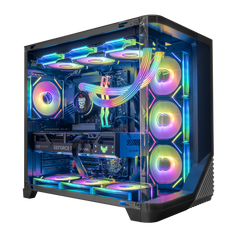




Direct answer: choose a gaming PC around the display, games, applications, budget, and upgrade plan you actually have. Then compare the complete configuration—not only the CPU and GPU names. A Tampa showroom visit can help you judge case size, port access, lighting, cooling layout, and the sound of an available display system, but always confirm that the system you inspect matches the listing you plan to buy.
This guide is for buyers who want a practical way to compare current systems online and in person. If you already know the general direction, browse current gaming PCs or use the custom PC builder to plan a different balance.
Start with the job, not the most expensive part
Write down the monitor resolution and refresh rate, the games you play most, and any work the PC also needs to handle. Competitive play at high refresh rates can create a different CPU and GPU balance from visually demanding 4K gaming. Streaming, editing, rendering, compiling, or other sustained work can change the processor, memory, storage, and cooling priorities again.
Budget matters, but it should follow the target. A useful buying brief can be short:
- Monitor resolution and refresh rate.
- Main games and the settings that matter to you.
- Non-gaming applications and any simultaneous work.
- Storage needed for the operating system, games, recordings, and projects.
- Preferred case size, appearance, noise profile, and likely future upgrades.
Compare the complete configuration
The graphics card and processor shape performance, but the supporting parts determine whether the system is complete for the job. Read the individual listing for the installed memory, storage, motherboard, cooling, power supply, networking, ports, case, operating system, and included accessories. Product-family photography can show the design without proving every installed component.
| Question | Why it matters | What to verify |
|---|---|---|
| What screen and games will the PC drive? | Resolution, refresh rate, settings, and game behavior change the hardware balance. | Exact CPU, GPU, display target, and current game-specific evidence. |
| What else runs at the same time? | Streaming, creation work, and heavy multitasking can change CPU and memory needs. | Processor, memory capacity and configuration, storage, and application requirements. |
| Will the case fit the room and future plan? | A system has to fit the desk, cable path, airflow, ports, and likely upgrades. | Case dimensions, front and rear connections, cooling layout, clearances, and expansion options. |
| Does the display unit match the listing? | A showroom system can be useful without being the exact configuration for sale. | Installed CPU, GPU, memory, storage, cooling, case, and current availability. |
For room placement, intake and exhaust clearance, dust, indoor humidity, and condensation guidance, read cooling and airflow in Florida rooms.
Match the CPU and GPU to the same target
A balanced system starts with a defined experience. The GPU is central to graphics settings and frame rate in many games, especially as resolution and visual settings rise. The CPU also matters for game logic, simulation, background tasks, high-refresh competitive targets, and non-gaming applications. The useful question is not which part is better in isolation. It is whether the pair fits the games, screen, settings, and other work you plan to run.
When you review performance evidence, match the game, resolution, preset, ray-tracing state, upscaling or frame-generation mode, processor, driver, and measurement type as closely as possible. One unlabeled FPS number is not a universal description of a complete PC.
Check memory, storage, and the parts behind the headline
Choose memory capacity around real software requirements and multitasking. More capacity can help when a workload needs it, but unused memory is not an automatic gaming-performance upgrade. Check the total capacity, module configuration, generation, and available expansion.
Estimate storage from the operating system, active game library, recordings, applications, and project files. Then verify the installed drive and the available expansion options. Also check the motherboard features, power supply, cooling, networking, and case rather than treating them as hidden support parts. Those decisions affect connectivity, fit, service access, and the upgrade path.
Use a showroom visit for the questions photos cannot answer
Specifications are the source of truth for the installed parts. A showroom visit adds physical context. At the Hyper Cyber showroom, visitors can compare available systems, see case designs and finished build details, and discuss prepared or custom configurations. Availability can change, so contact the showroom before traveling if you want to inspect a particular system.
Use the visit to check:
- Case footprint: judge the real height, width, depth, and how the system would fit near your desk and cables.
- Port placement: check whether the top, front, and rear connections work for your peripherals and room layout.
- Interior access: look at the panel access, cable paths, fan positions, storage locations, and visible expansion room.
- Lighting and materials: view the finish and lighting at full size instead of relying only on product images.
- Available-system sound: listen to the display system under the conditions available during the visit, without treating one room or one configuration as a universal acoustic result.
- Configuration match: ask whether the display system has the same parts and cooling as the listing you are considering.
Showroom testing and pre-shipment checks answer different questions. A visit helps you compare the physical experience of an available system. Pre-shipment checks review the completed configuration being prepared for its owner. See how Hyper Cyber tests gaming PCs for the purpose and limits of that process.
Decide between a prepared system and a custom configuration
A prepared system can simplify the decision when its complete specification already fits the job. A custom configuration is useful when you need a different balance of graphics, processor, memory, storage, cooling, connectivity, appearance, or expansion. Neither path is automatically better. Compare the exact specification, current terms, and the work the PC needs to do.
For a local overview of how Hyper Cyber approaches prepared and custom systems, visit custom gaming PCs built in Tampa. Use the live product and builder pages for current configurations and availability.
Plan a Tampa showroom visit
The Hyper Cyber showroom is at 4460 Eagle Falls Place, Tampa, FL 33619. Current published hours are Monday through Friday, 9:30 AM to 6:00 PM. Appointments are recommended so the team can prepare for the visit; walk-ins are welcome based on availability.
Before traveling, check the current showroom page and appointment form. If you want to see a particular system, ask whether it is available and whether its configuration matches the listing you are considering.
Gaming PC buying questions
What should I know before buying a gaming PC?
Know the monitor resolution and refresh rate, main games, desired settings, non-gaming applications, budget, storage needs, case constraints, and likely upgrades. Those facts make the complete parts list easier to evaluate.
Can I test a gaming PC before buying it in Tampa?
The Hyper Cyber showroom lets visitors see and test available systems. Contact the showroom before traveling if you want to inspect a specific model or configuration.
Do I need an appointment for the Hyper Cyber showroom?
Appointments are recommended so the team can prepare for the visit. Walk-ins are welcome based on availability.
What should I check on a gaming PC listing?
Check the exact CPU, GPU, memory, storage, motherboard, cooling, power supply, networking, ports, case, operating system, warranty, shipping terms, and current availability. Do not assume every product-family photo shows the listed internal configuration.
Should I buy a prepared gaming PC or configure a custom one?
Choose a prepared system when its complete specification fits the target. Use a custom configuration when you need a different balance of performance, appearance, storage, connectivity, cooling, or upgrade options.
Where is Hyper Cyber in Tampa?
Hyper Cyber is at 4460 Eagle Falls Place, Tampa, FL 33619. Use the showroom page for current hours, appointment booking, and visit guidance.
Choose the system around the experience you want
Start with the screen, games, applications, room, and upgrade plan. Compare the complete configuration online, then use a showroom visit for the physical details that listings cannot fully communicate. Browse current gaming PCs, plan a system with the custom PC builder, or book a Tampa showroom visit.


