






















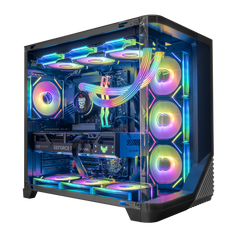




Quick answer: At Hyper Cyber, an Ultra White build is planned as a complete system before it is treated as a color palette. We establish the workload, component balance, cooling layout, cable paths, and upgrade access first. Then we coordinate the visible surfaces. The finished PC should still make sense with the lighting reduced and should remain understandable when it is time to clean, service, or upgrade it.
The photographs used with this article show a real Hyper Cyber Ultra White+ system. They document a design direction—white surfaces, visible cable runs, liquid-cooling hardware, fans, a graphics card, and integrated displays—not a promise that every live listing uses the same internal parts. Exact configurations must always be checked on the individual product page.
We start with the job, not the palette
Before we decide how strict the white theme should be, we define what the system needs to do. The display resolution and refresh rate matter. So do the games, applications, simultaneous workloads, storage needs, and expected upgrade path. Those answers establish the useful CPU and GPU balance, memory and storage capacity, cooling requirement, power supply, and case size.
This order protects the parts that determine how the PC works. A white graphics-card shroud can be a strong visual choice when the right model is available, but color is not a good reason to move to the wrong performance tier or force unsuitable hardware into the enclosure. The same rule applies to the motherboard, cooler, memory, and power supply.
For the broader buyer-facing version of that decision, see our white gaming PC buying guide. This article focuses on what happens after the visual direction and workload are known.
We map the visible surfaces
A white build does not need every hidden component to use the same finish. It needs the visible surfaces to read as one deliberate object from the owner's normal viewing angle.
The case, fan frames, cooler, memory heat spreaders, graphics-card shroud or backplate, and the main cable runs usually carry most of the visual weight. A dark storage device under a motherboard heatsink or a power supply behind a shroud may contribute almost nothing to the finished view. Matching an invisible part is hard to justify when that choice would reduce storage, cooling capacity, power headroom, or upgrade flexibility.
We also look at negative space. A build can contain excellent parts and still feel crowded if the radiator tubes cross the focal point, the graphics-card cable has no breathing room, or decorative hardware blocks the view of the components that are meant to define the design. The empty space around a component is part of the composition.
Cooling is a geometry decision
The cooling plan is not chosen from color alone. Processor requirements, graphics-card dimensions, case intake, exhaust paths, radiator support, fan direction, memory height, cable bend room, and access to filters all have to fit together.
We plan the major physical relationships before treating symmetry as a goal. A row of matching fans does not help if an intake is restricted. A white radiator is not useful if its position makes the graphics-card power cable press against the panel. A large cooler is not an upgrade if it blocks memory, storage, or service access without a reason tied to the configuration.
That is why product-family photography should be read as visual context, not as a specification sheet. The exact graphics card, cooler, fan count, motherboard, and cable layout can change with the system. The individual listing remains the source for the installed hardware.
Cable routing has three jobs
In an Ultra White build, visible cables are part of the architecture. They create strong lines through the glass and can connect the case, graphics card, motherboard, and cooling into one visual system. Their first job, however, is electrical: the correct cables and connectors must suit the installed hardware.
The second job is physical. A cable needs enough length and bend room to reach its connector without being stretched, crushed, or sharply forced against a panel. It should not cross a fan path or turn routine access into a teardown.
The third job is visual. Once the connection and route are sound, the exposed run can be combed, grouped, and aligned so it supports the layout instead of competing with it. The rear chamber matters too. A clean front view should not be created by compressing every extra cable behind the side panel.
Displays and lighting are the finish layer
White interior surfaces reflect more of the installed lighting, which means the system often needs less brightness than a darker build to make the color visible. We treat lighting as adjustable and the physical layout as permanent.
A useful test is to reduce the lighting. The case, cooling, cable runs, and component spacing should still look intentional. Lighting can then shift the mood—cool blue, neutral white, warmer amber, or a mixed profile—without being responsible for hiding an unresolved layout.
Integrated display panels can become strong focal points, so their content and brightness should be treated as part of the same hierarchy. They should support the system rather than pull attention away from every other surface.
Upgrade access is designed into the layout
An upgradeable PC is not simply a system with replaceable parts. The owner also needs practical access to those parts.
During planning, we consider whether memory slots, storage positions, graphics-card retention, power connectors, removable panels, and dust filters remain reachable. We also consider how a future graphics card, additional storage, or a memory change could affect the same cable and cooling plan.
No case can make every future component fit, and no power supply creates unlimited headroom. The useful goal is to avoid unnecessary obstacles and make the current configuration understandable. A clean layout should help the next technician or owner see what connects where.
The finished system is checked as a complete configuration
Hyper Cyber plans and checks complete systems in Tampa before shipment. Compatibility review, assembly, cable routing, setup when applicable, and configuration-appropriate system checks are connected parts of the same workflow.
That process does not produce one universal frame rate, temperature, noise level, benchmark score, software tool, or test duration for every PC. Different hardware and workloads need different context. The purpose is to find a configuration, connection, stability, or cooling issue while the system is still with the build team.
Our working order for an Ultra White build
- Define the display, games, applications, simultaneous work, storage needs, and upgrade plan.
- Choose the CPU, GPU, memory, storage, motherboard, cooling, power supply, and case as one configuration.
- Map the viewing angle and identify the surfaces that actually need to match.
- Confirm cooling geometry, physical clearances, cable bend room, and filter access.
- Route visible and hidden cables for correct connection, service access, and a coherent front view.
- Apply lighting and display content as the finish layer.
- Assemble and check the complete system before shipment.
Ultra White build planning FAQ
Does every visible part need to be white?
No. The case, fans, cooler, memory, graphics-card finish, and visible cable runs usually do most of the visual work. A neutral component can remain practical when it is hidden or when matching it would weaken the configuration.
Does an Ultra White build require liquid cooling?
No. Cooling should be selected for the processor, graphics card, case, airflow path, workload, and service goals. Air or liquid cooling can fit a white design when the complete layout supports it.
Why plan cable routes before assembly?
The route affects connector reach, bend room, panel clearance, fan paths, service access, and the visible composition. Planning early reduces the need to solve those conflicts after the major components are installed.
Can a white gaming PC still be easy to upgrade?
It can be planned with upgrades in mind, but compatibility still depends on the case, motherboard, power supply, cooling, and the future part. Keeping memory, storage, graphics-card retention, connectors, panels, and filters accessible makes later work more practical.
Do the article photos show one exact configuration for sale?
No. They are representative Ultra White+ product-family photography. The images show real design and routing details, but the exact installed hardware must be verified on the live product page.
Where does Hyper Cyber plan and check complete systems?
Hyper Cyber assembles and checks complete systems at its Tampa facility. The exact checks depend on the installed hardware and what the build team needs to verify.
Plan the complete object
An Ultra White PC works best when color supports the system instead of controlling it. Define the workload, protect the cooling and electrical decisions, map the visible surfaces, leave room to service the hardware, and apply lighting last.
Compare current white gaming PCs, or start a custom PC request when the available configurations do not match the workload, design direction, or upgrade plan.


