






















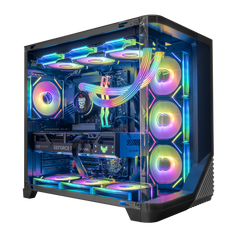




Direct answer: choose an RTX 5080 system when you want a high-end gaming PC and the 16 GB graphics-memory configuration fits your games, display, and creator work. Choose an RTX 5090 system when its 32 GB of graphics memory or additional GPU headroom solves a real 4K, rendering, 3D, editing, or local AI need. The better buy is the complete system that fits the job—not automatically the more expensive GPU.
Both GPUs use NVIDIA's Blackwell architecture, but they place very different demands on the budget, power supply, cooling, and case. Start with the display or application you actually use, then compare the processor, memory, storage, exact graphics-card model, power delivery, airflow, and upgrade plan.
RTX 5080 vs RTX 5090 at a glance
The table below uses NVIDIA's reference specifications. Graphics cards from board partners can use different clocks, coolers, dimensions, and power limits, and a complete system can require different supporting hardware.
| Specification | GeForce RTX 5080 | GeForce RTX 5090 | Why it matters |
|---|---|---|---|
| Standard graphics memory | 16 GB GDDR7 | 32 GB GDDR7 | Capacity matters when a game, scene, model, or creator project can genuinely use more than 16 GB. |
| Total graphics power | 360 W | 575 W | Higher GPU power affects the power supply, connectors, cooling, case airflow, heat, and acoustics. |
| NVIDIA reference required system power | 850 W | 1,000 W | This is a reference starting point, not a substitute for checking the exact card and complete configuration. |
Sources: NVIDIA GeForce RTX 5080 specifications and NVIDIA GeForce RTX 5090 specifications.
Choose the RTX 5080 when the complete system matters more than maximum GPU headroom
The RTX 5080 is the more practical high-end choice when its 16 GB of graphics memory fits the work and the rest of the budget still needs to cover the processor, display, storage, memory, cooling, acoustics, or the physical design of the system. A more balanced complete setup can be more useful than moving one part to the flagship tier.
That is especially true when the target is defined: a known set of games, a particular 4K monitor, a creator application with understood memory needs, or a desk and case layout with specific acoustic and thermal limits. Buyers in this group can compare current RTX 5080 gaming PCs rather than paying for capacity or headroom they will not use.
Choose the RTX 5090 when 32 GB or maximum GeForce headroom changes the work
The RTX 5090 makes the strongest case when its 32 GB of GDDR7 memory or additional GPU resources remove a real constraint. That may be a demanding high-resolution game and refresh-rate target, a large 3D scene, GPU rendering, high-resolution video work, or a local AI workload that exceeds the memory available on a lower-tier card.
Do not turn that into a universal promise. Game performance still depends on resolution, settings, CPU, patch, driver, upscaling mode, frame generation, and the exact graphics card. Professional and AI applications also have their own memory, software, and compatibility requirements. Review the application documentation before choosing a system.
If the workload genuinely benefits, compare current RTX 5090 gaming PCs by complete configuration, not by the GPU badge alone.
Resolution alone does not decide the GPU
“I play at 4K” is useful context, but it is not a complete requirement. A competitive game at tuned settings, a cinematic game with ray tracing, and a heavily modded title can put very different loads on the same system. Monitor refresh rate also changes the target. The practical question is which games you play, which settings you value, what frame-rate range you consider useful, and whether you are comfortable using upscaling or frame generation.
Start with the display and software, then use the 4K gaming PC collection to compare several complete-system approaches. No GPU guarantees the same result in every game.
Power, cooling, and case fit belong in the buying decision
NVIDIA lists substantially different reference power figures for these GPUs. That does not mean every RTX 5080 or RTX 5090 card uses the exact reference number. Board-partner models vary, and the rest of the system changes the required power and cooling plan.
Before ordering, check the exact graphics-card model, power-supply capacity and connectors, case clearance, airflow path, cooler, and fan layout. A larger power supply label by itself does not prove the complete configuration is right; the connections, component quality, and system design must also fit the hardware.
The CPU, memory, and storage still have jobs to do
A flagship GPU does not make the processor interchangeable. CPU-sensitive games, simulation, streaming, background tasks, and professional applications can change the appropriate pairing. The same applies to system memory and storage: choose capacity for the actual software and file set rather than treating a larger number as automatically faster.
If you need a particular CPU, memory capacity, storage layout, case, or visual direction, use the custom PC builder. Hyper Cyber reviews the complete configuration for compatibility and tests the assembled system according to its installed hardware and intended use. The public gaming PC testing methodology explains that process without promising one universal test duration or result.
A simple decision framework
- Define the target. List the display resolution and refresh rate, games or applications, preferred settings, and any creator or AI workloads.
- Check graphics-memory needs. Confirm whether 16 GB fits the workload or whether 32 GB removes a documented limit.
- Compare complete systems. Review CPU, system memory, storage, exact GPU model, power supply, cooling, case, operating system, and connectivity.
- Account for the room and desk. Heat, acoustics, physical size, monitor choice, and upgrade access are part of ownership.
- Spend only where the use case changes. If the flagship does not create a visible or measurable benefit for your work, put the budget into the rest of the setup or keep it.
RTX 5080 vs RTX 5090 FAQ
Does every 4K gaming PC need an RTX 5090?
No. The right GPU depends on the game, settings, refresh-rate target, CPU, and complete-system budget. Many buyers should compare both GPUs and decide from the actual target rather than the resolution label alone.
How much graphics memory do the RTX 5080 and RTX 5090 have?
NVIDIA lists 16 GB of GDDR7 memory for the GeForce RTX 5080 and 32 GB of GDDR7 for the GeForce RTX 5090.
Is the RTX 5090 automatically better for competitive games?
No. Competitive performance can become sensitive to the CPU, game engine, settings, and display target. More GPU resources do not remove every other system limit.
Should a creator always choose the RTX 5090?
Only when the application, project size, rendering workflow, or memory requirement benefits from it. Check the software vendor's current hardware guidance and compare the time saved with the total system cost.
What should I compare besides the GPU?
Compare the processor, memory capacity and layout, storage, exact graphics-card model, power supply and connectors, cooling, case clearance, operating system, connectivity, monitor, acoustics, and upgrade plan.
Choose the system, not the badge
The RTX 5080 is the better fit when it meets the real workload and leaves room for a stronger complete setup. The RTX 5090 is the better fit when 32 GB of graphics memory or maximum GeForce headroom solves a defined problem. Compare RTX 5080 systems, RTX 5090 systems, or build a custom PC around the display and workload you actually use.


