






















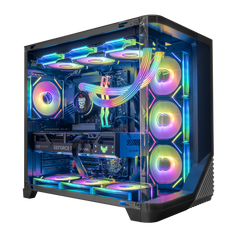



Liquid cooling uses a closed loop of liquid (usually water or coolant) to transfer heat away from the CPU – and sometimes the GPU – to a radiator, where fans dissipate the heat into the air. In gaming PCs, this usually means an all‑in‑one (AIO) liquid cooler.
How Liquid Cooling Works
A typical AIO CPU cooler includes:
- a pump and cold plate mounted on the CPU
- tubes carrying coolant to and from a radiator
- a radiator with fans mounted to the case (120/240/360 mm, etc.)
Heat moves from the CPU into the liquid, then into the radiator, then out into the case air and finally outside.
Why Gamers Choose Liquid Cooling
Reasons to pick liquid cooling:
- better thermal headroom for high‑TDP CPUs and overclocking
- potentially lower noise at a given performance level
- cleaner clearance around the CPU socket (good for tight RAM layouts)
- aesthetics – popular in showcase builds like transparent gaming PCs and anime gaming PCs
Trade‑offs:
- more complex installation
- reliance on pump and sealed tubing (rare but possible failures)
- higher cost than basic air coolers
That’s why many high‑end liquid‑cooled PCs use AIOs specifically on CPUs that will be heavily loaded or overclocked.
Related Concepts
-
Cooling – Liquid cooling is one approach within the broader cooling strategy.
-
Overclocking – Higher clocks benefit from the extra thermal headroom liquid cooling can provide.
-
TDP – High‑TDP CPUs are prime candidates for liquid coolers.
- Form Factor – Case size and radiator support determine which AIOs will fit.


