






















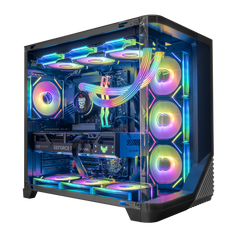




The best gaming PC under $3,000 is the one that spends heavily on the experience you can describe: your display, games, settings, frame-rate target, and other software. The higher budget can buy a stronger graphics platform, more useful CPU headroom, better storage and memory capacity, or a more distinctive enclosure—but it cannot make every premium feature equally valuable. Start with the job, then fund the parts that change it.
Browse the current Hyper Cyber gaming PCs under $3,000 by exact configuration. Product families can have multiple variants, so confirm that the selected variant—not only the displayed “from” price—stays within your ceiling. Check the current CPU, GPU, memory, storage, cooling, power supply, price, and availability before ordering.
Updated November 3, 2026. This is a budget-allocation framework, not a promise that one configuration is best for every game or buyer. Inventory, product variants, and prices change.
What a budget up to $3,000 should change
| Buyer target | Fund first | Do not assume | Verify before buying |
|---|---|---|---|
| Visually demanding 1440p gaming | Graphics card, then a CPU and platform that support the target | That the highest-priced CPU produces the best complete build | Game-specific tests at the intended settings and upscaling mode |
| High-refresh competitive play | CPU/GPU balance, stable frame delivery, display, and low-latency setup | That a larger case, more RGB, or extra unused storage raises frame rate | CPU-sensitive game results and the monitor's actual refresh target |
| Selective 4K gaming | Graphics performance and VRAM appropriate to the exact games and settings | That any PC near $3,000 is a universal high-refresh 4K system | Preset, ray tracing, upscaling, frame generation, and accepted frame-rate range |
| Gaming plus streaming or creator work | Complete workload: GPU, CPU, memory, storage, and required media features | That a gaming-only parts hierarchy fits editing, rendering, or development | What runs at the same time and which applications use the CPU, GPU, RAM, and storage |
The practical change at this budget is choice. You can put more money into the graphics card, preserve stronger CPU headroom, choose more storage, or pay for a more elaborate physical design. The budget is still finite. Spending more in one area still removes money from another.
Start with the screen and the games
Write down the display resolution, refresh rate, games, graphics settings, and frame-rate range you care about. Add ray tracing, upscaling, frame generation, mods, recording, streaming, editing, and other active applications. A useful recommendation begins with that list, not with the case name or one headline component.
A competitive player using reduced settings at a high refresh rate can be more sensitive to processor performance and frame consistency than a buyer targeting richer visual settings. A visually demanding 1440p or 4K game can put more pressure on the graphics card. Strategy games, simulations, compilation, streaming, and creator work can shift the balance again.
There is no honest universal split such as “spend exactly half the budget on the GPU.” The right ratio changes with the game, monitor, workload, and current part prices. Define the result first, then compare complete systems that can plausibly deliver it.
Protect the graphics budget without buying by model name alone
The graphics card is central to most gaming-focused builds, but the label on the box is not a complete performance claim. Compare the exact GPU in the exact games, resolution, preset, ray-tracing mode, and upscaling settings you plan to use. A vendor feature page is useful for specifications and supported technologies; independent testing with a documented setup is still needed for a buying decision.
Current systems in the collection span different NVIDIA GeForce and AMD Radeon tiers. NVIDIA's official GeForce RTX 5060 family specifications and AMD's official Radeon RX 9060 XT specifications show why the exact model and memory configuration matter. They do not prove how a complete Hyper Cyber system will perform in every game.
Do not pay for graphics capacity that your display and games will not use. Do not underfund it while spending heavily on appearance, excessive CPU capacity, or storage you can add later. If 4K is the goal, use the separate 4K gaming PC guide to define the games, settings, ray tracing, upscaling, and acceptable frame-rate range before choosing the tier.
Spend on the CPU when the workload can use it
The processor handles game logic, simulation, background tasks, and non-gaming work. High frame-rate targets, CPU-heavy games, large simulations, streaming, compiling, and creation applications can justify more processor budget. At higher resolutions or demanding visual settings, the graphics card may become the clearer limit.
The live collection currently includes systems built around several processor families rather than one universal “best” chip. Use the official specifications for parts such as the AMD Ryzen 7 7800X3D, AMD Ryzen 5 9600X, and Intel Core i7-14700K to verify cores, platform, memory support, and other published details. Then use workload-relevant tests rather than treating a specification sheet as a universal ranking.
For a practical pairing method, read the CPU and GPU bottleneck guide. The goal is not to eliminate every possible limit. It is to avoid an expensive mismatch for the work that matters to you.
Use memory and storage to solve real capacity needs
At this budget, 32GB can be a practical starting point for many gaming PCs and normal multitasking, but it is not mandatory for every system and 64GB is not automatically better. Choose capacity around the games, applications, virtual machines, projects, and background tasks that will run together. The 32GB versus 64GB RAM guide covers that decision in detail.
Storage is easier to evaluate when you list the operating system, active game library, applications, recordings, and project files. More initial capacity can reduce day-to-day file management. It can also consume budget that would have changed the GPU, CPU, monitor, or another harder-to-upgrade part. Confirm the installed SSD, available slots, and upgrade path on the exact product page.
Memory generation, module count, speed, motherboard support, and future expansion matter alongside total capacity. A large number in one field should not hide a weak complete configuration.
Supporting parts are part of the experience
A power supply needs the appropriate capacity, connectors, and quality for the complete system. Cooling and airflow need to suit the installed hardware and the room where the PC will operate. The motherboard determines socket and memory support, storage expansion, networking, ports, and other upgrade constraints. The case determines physical fit, airflow options, access, and how the system belongs in the room.
These parts rarely lead the product title, but they can shape noise, temperatures, connectivity, maintenance, and future changes. Check what is actually listed. Ask before ordering when a required motherboard feature, connector, wireless standard, storage slot, cooler, or power-supply detail is unclear.
Hyper Cyber documents the general pre-shipment approach on the gaming PC testing page. Treat that process as quality-control context, not a benchmark for an unspecified configuration.
Where the extra budget becomes a preference
Once the performance and capacity requirements are covered, the remaining budget can go toward appearance, a larger or more distinctive enclosure, additional lighting, display panels, quieter component choices, extra storage, premium connectivity, or a cleaner long-term upgrade path. Those can be valid reasons to spend more. They are not the same as more gaming performance.
This is where buyers should be honest about the objective. A gaming PC is also a physical object in the setup. Paying for materials, layout, lighting, or a case design you want is reasonable when it does not displace a requirement you care about more. The mistake is describing every aesthetic upgrade as a frame-rate upgrade.
How to compare current systems under $3,000
- Write the target. Record the monitor, resolution, refresh rate, games, settings, frame-rate range, and other software.
- Set the real ceiling. Include any monitor, peripherals, tax, shipping, or services that must fit inside the same total.
- Check the selected variant. Configurable product families can include options above the starting price. Confirm the exact variant, current price, and availability.
- Compare complete specifications. Read the CPU, GPU, graphics memory, system memory, storage, motherboard, cooling, power supply, networking, ports, case, and included software.
- Use relevant evidence. Look for current game- or application-specific tests at settings close to your target. Separate vendor claims, third-party tests, and Hyper Cyber measurements.
- Check the upgrade path. Decide which parts are likely to change and whether the platform, case, power, and cooling leave a sensible route.
If the prepared systems do not allocate the budget around your actual workload, use the Hyper Cyber custom PC builder and describe the display, games, applications, preferences, and ceiling. Buyers working to a lower ceiling can use the gaming PC under $2,000 guide to see where the tradeoffs tighten.
Frequently asked questions
What should a gaming PC under $3,000 prioritize?
Prioritize the experience you can define. For many gaming-focused systems, that means protecting the graphics-card budget while choosing enough CPU, memory, storage, cooling, and power for the target. High-refresh competitive play, simulations, streaming, and creator work can change the balance.
Can a gaming PC under $3,000 handle 4K?
Some configurations can suit particular 4K games and settings, but a price ceiling does not guarantee universal high-refresh 4K performance. Check the exact GPU and CPU combination, game, preset, ray tracing, upscaling, frame generation, and acceptable frame-rate range.
Should I spend more on the GPU or CPU?
Spend where the target is constrained. Visually demanding settings often make the GPU more important, while high frame-rate targets, CPU-heavy games, simulation, streaming, and other applications can justify more CPU budget. Compare the pair as part of the complete system.
Is 32GB of RAM enough at this budget?
It is a practical starting point for many gaming PCs and everyday multitasking. Choose 64GB when a simulator, creator tool, development project, virtual-machine setup, or simultaneous workload has a real need for it. Extra unused capacity does not automatically improve gaming.
Is 1TB of storage enough for a gaming PC?
It depends on the operating system, applications, active game library, recordings, and project files. Estimate the real footprint and check the expansion path. A larger initial SSD can reduce file management, but it should not displace a component that changes the primary experience more.
Is a prebuilt or custom gaming PC better under $3,000?
A prebuilt is useful when a current configuration already matches the target and you want a straightforward purchase. A custom request is useful when you need a specific GPU/CPU balance, memory or storage capacity, appearance, connectivity, size, noise preference, or upgrade path. The better route is the one that fits the requirement and current terms.
Choose the configuration, not the price badge
A budget up to $3,000 can create a strong, balanced gaming PC, but it still requires priorities. Define the screen, games, settings, frame-rate target, other software, capacity, and upgrade plan. Then compare current Hyper Cyber gaming PCs under $3,000 by the selected variant, or use the custom PC builder when the available systems do not put the money where your workload needs it.


