


























Direct answer: an RTX 5090 does not choose the rest of the PC. At Hyper Cyber, we start with the exact graphics-card model and the work the system must do. Then we review the CPU, motherboard, memory, storage, power supply, connectors, cooling, case, clearance, airflow, software setup, and validation as one configuration.
That order matters because “RTX 5090” describes one component class, not one complete build. Two systems can use the same GPU name and still be very different machines. The correct supporting parts depend on the exact card, display, games or applications, simultaneous workloads, storage needs, physical layout, and ownership plan.
This article explains our planning framework. It does not publish a universal parts list, frame-rate promise, temperature target, noise number, software tool, or test duration. Those details change with the installed hardware and intended use.
We define the job before we finish the parts list
The first useful question is not “what is the strongest CPU we can add?” It is “what does this system need to do?” A high-refresh competitive setup, a 4K single-player system, a 3D workstation, a rendering machine, a high-resolution editing system, and a local AI workstation can all justify different choices around the same graphics card.
We want the display target, games, applications, simultaneous work, project size, storage needs, connectivity, and upgrade expectations in view before the supporting configuration is settled. That context helps separate a component that solves a real constraint from a larger number that does not change the work.
For buyers still deciding whether the flagship is necessary, our RTX 5080 vs RTX 5090 comparison starts with that workload decision. This page begins after the RTX 5090 has a reason to be in the system.
The exact graphics card comes before the case and power plan
We do not treat every RTX 5090 card as physically or electrically identical. NVIDIA's published reference specifications provide a useful starting point, but add-in-card manufacturers can use different coolers, dimensions, clocks, and power behavior. The exact shipping card is the specification that has to fit the finished build.
NVIDIA lists 32 GB of GDDR7 memory, 575 W total graphics power, and 1,000 W required system power for its reference RTX 5090 design. NVIDIA also states that system requirements can change with the complete configuration and that card specifications can vary by manufacturer. That is why we use those figures as context, not as a substitute for checking the actual card and system.
Source: NVIDIA GeForce RTX 5090 specifications.
Power planning is more than a wattage label
The power supply has to make sense for the installed graphics card, processor, motherboard, cooling, storage, and the rest of the configuration. Capacity matters, but so do the correct connections, the way the cable reaches the card, and the physical room available for the route.
A larger number on the power-supply label does not settle those questions. We review the complete electrical and physical relationship: the exact card's current requirements, the power-supply specification, the available connectors, the case layout, and the cable path. If any one of those changes, the correct answer can change with it.
Cooling is a geometry decision
A high-power GPU affects the space around it. Card length, width, cooler shape, expansion-slot use, nearby intake area, exhaust path, CPU cooler, memory height, storage placement, and cable bend room all influence the layout.
We look at the case as a working volume, not only as an exterior style. Air needs a clear route through the system. The graphics card and CPU cooler need appropriate space. Panels, filters, connectors, memory, storage, and retention points should remain practical to inspect and service.
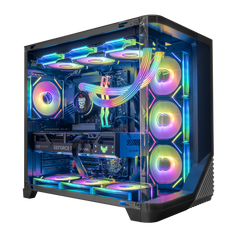
The image used with this article is a real Hyper Cyber NOVA product-family interior. It shows the kind of relationship we review—graphics card, CPU cooler, memory, cabling, fans, and open space—but it is not presented as one exact RTX 5090 configuration for sale. The individual product page remains the source for installed hardware.
The CPU is chosen for the workload, not the badge beside it
An RTX 5090 does not make the processor interchangeable. Some high-refresh games and simulation workloads can become sensitive to CPU behavior. Rendering, editing, streaming, compiling, and other production work can place different demands on core count, sustained load, memory, and the software platform.
The practical pairing comes from the target. We review which games or applications matter, what runs at the same time, the display goal, and whether the work has a documented processor or platform requirement. The answer should be tied to the job instead of a rule that every flagship GPU must receive one flagship CPU.
Memory and storage are planned from the actual data
The RTX 5090's 32 GB of graphics memory is separate from system memory. More graphics memory does not remove the need to size RAM for the operating system, applications, project files, background tasks, and simultaneous work. It also does not decide how much storage the owner needs.
For memory, we look at the applications and how they are used together. For storage, we look at the size of the game library, projects, source media, models, scratch data, and future expansion. Capacity is useful when the data needs it. It is not a universal performance multiplier.
Setup depends on the installed hardware
After the physical configuration is defined, setup can include BIOS adjustments, Windows installation, and essential driver configuration when applicable. The word “applicable” is important. A setting that makes sense for one motherboard, processor, memory kit, or workload is not automatically correct for another.
We do not publish one BIOS profile or software checklist as a universal recipe for every RTX 5090 system. The installed hardware and intended use determine what needs attention.
The finished PC is checked as one system
Hyper Cyber reviews configured systems as complete builds, assembles them by hand in Tampa, and evaluates the finished PC before shipment. The purpose is to surface behavior that needs attention while the system is still with the build team, including instability, an incorrect configuration, or cooling behavior that does not look right for that system.
The exact checks can vary with the hardware and with what needs to be verified. A compact build and a larger high-power tower are not identical. A gaming workload and a long creator workload do not stress the same parts in the same way. One benchmark cannot represent every game, application, room, driver, or future update.
If a check finds a problem, the system stays with the build team while the issue is investigated and corrected. The relevant checks are then run again before the PC is cleared for shipment. Read how Hyper Cyber tests gaming PCs for the full purpose and limits of that process, or see what we check before a Hyper Cyber PC leaves Tampa for the broader pre-delivery sequence.
Our RTX 5090 system-planning order
- Define the workload. Record the display, games, applications, simultaneous tasks, project sizes, connectivity, storage, and upgrade goals.
- Confirm the exact graphics card. Use the shipping card's dimensions, cooler, power requirements, and manufacturer guidance.
- Choose the supporting platform. Match the processor, motherboard, system memory, and storage to the work.
- Plan power and physical fit together. Review the power supply, connections, case clearance, cable path, cooling, airflow, and service access.
- Assemble and set up the installed configuration. Apply BIOS, operating-system, and driver work when it is appropriate for that hardware.
- Check the finished system. Use configuration-appropriate checks, correct any issue found, and repeat the relevant checks before shipment.
RTX 5090 system-planning FAQ
Does every RTX 5090 system use the same power supply?
No. NVIDIA publishes reference power information, but the exact card, processor, supporting components, and complete configuration determine the final requirement. Check the graphics-card and power-supply manufacturers' specifications for the installed parts.
Does every RTX 5090 card fit the same case?
No. Card dimensions and cooler designs can vary by manufacturer. Case clearance, expansion slots, cable room, airflow, and the rest of the cooling layout must be checked against the exact card.
What CPU should be paired with an RTX 5090?
The useful pairing depends on the games or applications, resolution, refresh-rate target, simultaneous work, and software requirements. There is no single processor that is automatically correct for every RTX 5090 build.
Is 32 GB of graphics memory the same as 32 GB of system memory?
No. Graphics memory belongs to the GPU. System memory supports the operating system and applications. Each capacity should be sized for the actual workload.
Does system testing guarantee one frame rate or temperature?
No. Performance and thermal behavior depend on the complete configuration, workload, settings, software versions, drivers, ambient conditions, and later updates. Testing is meant to identify issues in the finished system, not create one blanket numerical promise.
Plan the complete system
The RTX 5090 can be the reason a build exists, but it should not be the only part receiving attention. Define the job, confirm the exact card, plan power and fit together, choose the CPU, memory, and storage for the work, and validate the finished PC as one configuration.
Compare current RTX 5090 gaming PCs, or use the custom PC builder when the workload, component preferences, or physical design calls for a specific configuration.


