






















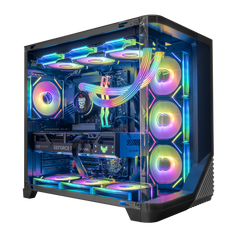




Before a Hyper Cyber PC leaves our Tampa facility, we review the build as one complete system. That starts with compatibility, continues through hand assembly and cable routing, and includes BIOS or software setup when applicable plus configuration-appropriate stability, thermal, CPU, and GPU checks. The exact sequence depends on the hardware; one universal benchmark, temperature, or test duration cannot describe every PC.
The purpose is practical: find a configuration, setup, connection, stability, or cooling issue while the system is still with our build team. A finished gaming PC is more than a processor and graphics card on a specification sheet. Its parts, firmware, cooling, power delivery, and physical layout have to work together.
For the complete methodology and its limits, see how Hyper Cyber tests gaming PCs before shipping.
The first check happens before assembly
A dependable build begins with a compatible configuration. For a custom system, our team reviews the selected processor, graphics card, memory, storage, motherboard, cooling, case, and power supply as a group. That matters because a part can be individually capable and still be a poor fit for the rest of the system.
Cooling has to suit the processor and the case. The power supply has to be appropriate for the installed hardware. The motherboard has to support the selected processor, memory, storage, connectivity, and expansion needs. The case has to provide the physical room and layout the configuration requires. This is why our custom PC builder asks for the core hardware and the workload: those details shape the rest of the build.
This review is not a promise that one configuration is perfect for every use. It is a check that the selected parts make sense together for the system being ordered.
Hand assembly and cable routing are part of the system
Hyper Cyber PCs are assembled by hand in Tampa. During assembly, the hardware is installed, power and data connections are made, and the cables are routed as part of the finished build. Cable management is not only visual. A clean layout makes the interior easier to inspect and easier to understand when the owner later adds storage, memory, or another upgrade.
The physical review focuses on the completed configuration, not on making every PC look identical. Different cases, cooling layouts, graphics cards, and storage choices create different routes and clearances. What matters is that the finished system reflects the hardware actually installed.
The photo with this article shows real finished Hyper Cyber systems in our Tampa space with several interiors visible. It is not a photograph of one specific customer order or a live test in progress.
BIOS and software setup depends on the build
Hardware installation is only one layer of a completed PC. When the configuration calls for it, the setup can include BIOS adjustments, Windows installation, and essential driver configuration. These steps connect the physical build to the software environment the customer will use.
The important word is when. A setting that is appropriate for one motherboard, processor, memory kit, or workload is not automatically correct for every other system. We do not publish one BIOS profile or software checklist as a universal recipe.
Stability, thermal, CPU, and GPU checks are configuration-specific
After assembly and setup, the finished PC is checked as a complete configuration. Depending on the hardware and what the build team needs to verify, that can include stress, thermal, CPU, and GPU checks.
These checks are meant to surface behavior that needs attention while the system is still in Tampa. They are not a guarantee that every game, application, future driver, room temperature, or later hardware change will produce the same result. A compact system and a high-power tower do not have identical cooling behavior. A gaming workload and a long rendering workload do not stress the same parts in the same way.
That is also why a benchmark number is useful only when its context is clear. Resolution, settings, processor, graphics card, memory, software versions, drivers, ambient conditions, and the date of the test can all change the result. When those details are not available, qualitative guidance is more honest than a precise-looking promise.
What happens when a check finds a problem
If a system shows behavior that needs attention, it stays with the build team. The issue is investigated and corrected, and the relevant checks are run again before the PC is cleared for shipment. A shipping schedule is not a substitute for addressing a known problem.
This does not mean that testing can predict every future software update or use case. It means the finished configuration is reviewed and checked before it leaves the facility, while the team can still act on what it finds.
What this process does—and does not—tell a buyer
The process tells you that Hyper Cyber approaches the PC as a complete build. Compatibility review, assembly, cable routing, applicable BIOS and software setup, and system-level checks are connected parts of the same workflow.
It does not create one guaranteed frame rate, temperature, acoustic level, clock speed, benchmark score, or test duration for every PC. Those outcomes depend on the exact configuration, workload, settings, environment, and software state.
For buyers, the practical value is transparency. You should be able to see the installed specifications, understand the intended use of the build, and know what the builder is trying to verify before shipment. If you are still comparing options, start with our current gaming PCs or describe your games, applications, display, and budget in the custom PC builder.
Built and checked in Tampa
Hyper Cyber assembles and tests gaming PCs at our Tampa, Florida location. The same place that displays finished systems is where the company explains its build-and-test approach. Tampa-area buyers can view current showroom details on the Hyper Cyber showroom page.
Support remains part of ownership after the PC leaves the facility. Current coverage is explained on the Hyper Cyber warranty page, including the stated parts and labor terms and their exclusions.
Pre-delivery checks FAQ
Does every Hyper Cyber PC receive exactly the same checks?
No single workload is equally useful for every configuration. The checks can vary with the installed hardware and with what the build team needs to verify.
Does system testing guarantee a specific frame rate?
No. Frame rate depends on the complete PC, game, resolution, settings, software versions, drivers, and later updates. A benchmark is useful only when that context is stated.
Does Hyper Cyber promise one temperature or noise level?
No universal temperature or acoustic number applies to every case, cooling layout, workload, room, and configuration. This process is not presented as a blanket numerical guarantee.
What happens if the team finds a problem?
The system stays with the build team while the issue is investigated and corrected. The relevant checks are then run again before shipment.
Where are Hyper Cyber gaming PCs assembled?
Hyper Cyber PCs are hand-assembled in Tampa, Florida. Current location and visiting information is available on the showroom page.
Does pre-delivery testing replace the warranty?
No. Pre-delivery checks and warranty coverage serve different purposes. Review the current warranty terms for coverage, duration, and exclusions.
Need help choosing a configuration? Browse current gaming PCs, start a custom build, or contact Hyper Cyber with the games, applications, resolution, and budget that matter to you.


